I have Windows 8.1 installed on Parallels VM (currently using version 16, created in version 13 earlier). All it has is Windows 8.1 and Visual Studio 2015. Initially I accommodated 64 GB when I created the VM and installed Visual Studio and I could happily see there was around 20 GB free. Soon something encroached all remaining space and I started getting alerts that Windows was out of space. Then I increased it to 128 GB as I had a lot of disk space remaining on my 1 TB SSD. Now it seems it has eaten up that extra space too. There was a 4GB installation image I copied to the C drive initially. I deleted that to free up space and it showed 4GB was free. However within minutes that was gone too. I have attached screenshots to show the following.
1. My Parallels PVM file for Windows 8.1 takes up around 128GB, which is the max configured in the settings.
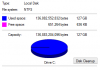
2. The same value is shown when I click on C drive and select properties.
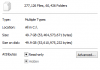
3. If I enable all hidden and system files and select everything on C drive and click on properties it shows it takes around 47 GB, which is the expected size of the VM.
4. I have no snapshots at all.
There are no Windows.Old or any temporary files or system restore images (that is disabled anyway). Trying to reclaim space shows no extra space can be reclaimed.
Can someone explain why is Parallels eating up the free space and more importantly how to stop this.
1. My Parallels PVM file for Windows 8.1 takes up around 128GB, which is the max configured in the settings.
2. The same value is shown when I click on C drive and select properties.
3. If I enable all hidden and system files and select everything on C drive and click on properties it shows it takes around 47 GB, which is the expected size of the VM.
4. I have no snapshots at all.
There are no Windows.Old or any temporary files or system restore images (that is disabled anyway). Trying to reclaim space shows no extra space can be reclaimed.
Can someone explain why is Parallels eating up the free space and more importantly how to stop this.