Will this Japanese mapping be ok ?

Hi everyone,

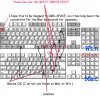
Can anybody verify these mappings between Mac and Win Japanese keyboards ?
Mapping image is atached to this post. There are 2 keys that have no direct mapping in the Apple Japanese keyboard (marked red). What's the best way to do with them ?

Regards.
 

Attachments

  • Win-Mac Mappings.jpg
    Win-Mac Mappings.jpg
    94.5 KB · Views: 30
Hi,

Forget the quote part below of my last post.
It will just confuse you.

I have sent a message to Max Kuzkin, my first impression
of the latest build.

Keys to the right of 0,P,L,M seem to be working.
The key you closed out on the top left hand corner
below the escape key on the Windows keyboard
is a very frequently used key and it needs to be mapped
somewhere on the Mac keyboard. The key left of the space
bar, I think, is a good place.

Tad said:
BTW, when running Windows on Boot Camp, I use the
following keyboard driver together with the Apple Wireless
keyboard (Bluetooth/JIS).

http://www.trinityworks.co.jp/software/AppleK/index.php
http://www.trinityworks.co.jp/software/AppleKPro/index.php

(I use the AppleK)

If I have the time, I will this together with the Parallels.
 
Can you please draw your mappings (lines between mac and win keyboards) on the picture. You can use the first picture in this post as basis.

Thanks
 
tacit_one,

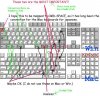
Please find the attached image, in which I made a few comments.
The most important problems sofar are the keys for ¥ (or |, when pressed with shift) and _, which are not recognized by the guest OS on ParallelsDesktop and hence I cannot map them to other keys. I will best appreciate if these two keys will be made working!

The key near the top-left which you checked with x is used to change the input mode between japanese and ascii. This has been mapped to cmd-space on the japanese Mac keyboards. At the moment I map this to alt-space, because the cmd key pops up the start menu ;-p. (I personally do not like this mapping, however. From time to time I press cmd-space and am surprized by poping-up start menu.)


The two keys near the space bar is used for porposes similar to the key mentioned just above, and your mapping may be OK. (I personally do not use them, because cmd-space do the same job. But I know there are many people who use these two keys instead of cmd-space.)
 

Attachments

  • Win-Mac-Mappings.jpg
    Win-Mac-Mappings.jpg
    124.1 KB · Views: 19
Hi targ,

I saw your post after sending in my report on the latest build.

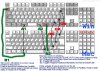
Attached is pretty much what I wrote in it.

I did not think of mapping key combination to a single Windows key.
That is a good idea. I can live with that. My map has CMD key assigned
to Start Menu key, but, I am not fussy at all about Start Menu key.

However, I also think it is important that the user can tell the function
of the key by just looking at them rather than having to remember
keyboard shortcuts, hence my mapping.

Lastly, I agree with you about keys on both side of the Space bar
in Windows. I do not use them either. But, the key you labelled
useless, I use it !
 

Attachments

  • Win-Mac-Mappings.jpg
    Win-Mac-Mappings.jpg
    106.2 KB · Views: 17
Tad said:
But, the key you labelled
useless, I use it !

Ooops, I am sorry!

You noted in the jpg file that the keys for ¥ and _ work in the latest build. Isn't it Parallels-Desktop-1842.7-Mac.dmg? In my RC2, these keys still do not work.
 
targ said:
Ooops, I am sorry!
It's alright. When, there is no one-to-one mapping available,
there is bound to be more than one solution.
As for the build, yes, it is not the RC2. I was asked to test
a build.
 
I think...

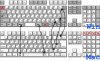
Please see this attachment image.
Also explain keys' functions.
 

Attachments

  • Win-Mac-Mappings-1mi.jpg
    Win-Mac-Mappings-1mi.jpg
    62.8 KB · Views: 21
It agrees with the macoilles idea.

About Win,ALT,B1,B2 Key map, I think that the idea of Mr. macoilles is the most reasonable.
In the future version, the customizing function of the key map like xmodmap is hoped for.
 
Back
Top