
When I enable Coherence and try to run the Magic: The Gathering Online game Parallels no longer renders that game's custom window border, background (or pretty much any of the window elements that use the color black) properly. It's odd but it only seems to affect the color black used in those elements. In addition it's not just a rendering issue. It actually makes those elements transparent and any click in the area goes straight through to the underlying Mac OSX. For example: If I two-finger click in the now transparent titlebar area it will popup the Finder context menu and allow me to perform any operation from that menu.
I do not experience this same problem in the VMWare Fusion product when running in Fusion mode. However, I appreciate the speed and performance of the Parallels product and would prefer to use it.
I have attached a screenshot of the issue showing the Coherence and non-Coherence mode rendering. The problem persists if I enable Coherence and switch to Full-screen mode. I have to turn off Coherence to fix the rendering.
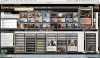

OFF ON
I do not experience this same problem in the VMWare Fusion product when running in Fusion mode. However, I appreciate the speed and performance of the Parallels product and would prefer to use it.
I have attached a screenshot of the issue showing the Coherence and non-Coherence mode rendering. The problem persists if I enable Coherence and switch to Full-screen mode. I have to turn off Coherence to fix the rendering.
OFF ON
