Install the app
How to install the app on iOS
Follow along with the video below to see how to install our site as a web app on your home screen.
Note: This feature may not be available in some browsers.
You are using an out of date browser. It may not display this or other websites correctly.
You should upgrade or use an alternative browser.
You should upgrade or use an alternative browser.
Window Size after update from Windows 7 to Windows 10
- Thread starter MarcK4
- Start date

i got a macbook pro 2016 retina and macos mojave.
test screen resulution.....but i can not push with the mouse the button to finished the windows 10 installation.
it is strange.
pic1 = windows 10 boots up
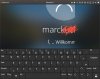
Pic2 = login is normal resolution
Pic3 =login change and a Keyboard displays
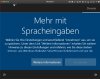
Pic4 =hanging on this screen
test screen resulution.....but i can not push with the mouse the button to finished the windows 10 installation.
it is strange.
pic1 = windows 10 boots up
Pic2 = login is normal resolution
Pic3 =login change and a Keyboard displays
Pic4 =hanging on this screen
Attachments



Maria@Parallels
Problem solver
there is no error message.it is an installing thing like "more with speak input"Hi @MarcK4, could you translate the error message, please?
the resolution of the text is so big and i cannot push the button right.
i think i had to scroll down and make a check and then i can push the right button.
it seems when windows 10 booting up to finishing the installation they change the screenresolution and i see only 20 % of the screen.
i have the newest parallels 14 update and toolbox installed.
change resolution on mac and resolution in the program.
test all but not working.
thx