Install the app
How to install the app on iOS
Follow along with the video below to see how to install our site as a web app on your home screen.
Note: This feature may not be available in some browsers.
You are using an out of date browser. It may not display this or other websites correctly.
You should upgrade or use an alternative browser.
You should upgrade or use an alternative browser.
Windows 10 Dock Start Menu Icon
- Thread starter RajeshT1
- Start date
Manu@Parallels
Guest
Hello Rajesh,
Could please provide us more details on this issue to assist you better.
Could please provide us more details on this issue to assist you better.
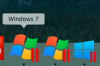
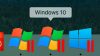
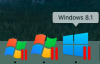
See attached images.. the Windows 10 icon looks like the Windows 7 icon. The Windows 8 icon looks appropriate in this scenario.
Attachments

Hello RajeshT1,
The Virtual Machine icons on the Dock are defined by the Operating System detected on the Virtual Machine's settings.
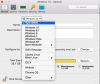
The name of the Virtual Machine (which is displayed while you hover the mouse over the icon on the Dock) is not always the same as the actual Operating System. This is because the the name of the Virtual Machine is user defined and changing it does not affect the configuration. To know the Operating System of the Virtual Machine, go to Configuration and under General tab you can see the Operating System drop down box above the 'Name' option.
You may select 'Auto Detect' and start the Virtual Machine to configure this automatically.
The Virtual Machine icons on the Dock are defined by the Operating System detected on the Virtual Machine's settings.
The name of the Virtual Machine (which is displayed while you hover the mouse over the icon on the Dock) is not always the same as the actual Operating System. This is because the the name of the Virtual Machine is user defined and changing it does not affect the configuration. To know the Operating System of the Virtual Machine, go to Configuration and under General tab you can see the Operating System drop down box above the 'Name' option.
You may select 'Auto Detect' and start the Virtual Machine to configure this automatically.