I've searched all over, and tried just about every possible combination of settings I've been able to find, and I'm going crazy trying to solve what should be a very simple problem:
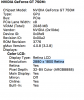
I run Windows 10 in bootcamp in the rMBP native resolution of 2880x1800, with 125% scaling. This works great for me, and I just want the same experience running Parallels 11, but regardless of how I configure "Best for retina", "Scaled", and the various display settings in OSX and Windows 10 I cannot get Parallels to give windows the standard, native resolutions.
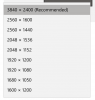
The closest I can get is choosing 3840x2400 (which windows running on Parallels seems to think is native res, since it's listed as "recommended") and setting the scaling option to 175%. It's still not as sharp as when running 2880x1400 in bootcamp, but it's something I can live with.
Why can Parallels 11 not present the native 2880x1400 resolution to Windows? It would seem like the most simple case, to use the native resolution?
I run Windows 10 in bootcamp in the rMBP native resolution of 2880x1800, with 125% scaling. This works great for me, and I just want the same experience running Parallels 11, but regardless of how I configure "Best for retina", "Scaled", and the various display settings in OSX and Windows 10 I cannot get Parallels to give windows the standard, native resolutions.
The closest I can get is choosing 3840x2400 (which windows running on Parallels seems to think is native res, since it's listed as "recommended") and setting the scaling option to 175%. It's still not as sharp as when running 2880x1400 in bootcamp, but it's something I can live with.
Why can Parallels 11 not present the native 2880x1400 resolution to Windows? It would seem like the most simple case, to use the native resolution?