Windows 10 Insider preview display issue

ArghyatilakC

Junior Member
HI,
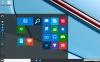
I upgraded my 8.1 to Windows 10 Tech preview last night. I use windows on my mac via parallels desktop 10.
There is something wrong with the display as any text is coming up as garbage and so does app names etc.
Can anyone help ? Else I will have to go back to 8.1

 

Attachments

  • Screen Shot 2015-06-12 at 22.12.02.png
    Screen Shot 2015-06-12 at 22.12.02.png
    74.6 KB · Views: 4
  • Screen Shot 2015-06-12 at 22.10.56.png
    Screen Shot 2015-06-12 at 22.10.56.png
    745.4 KB · Views: 5
Hi Paul,
I was trying to troubleshoot when I realised that if I uninstall "Parallel Tools" the system is behaving fine. Installing this back again starts the same issue.
Maybe this will help with your investigation.
Thanks
 
I'm having the same problem of text not showing up in Windows 10 Preview. How do I uninstall Parallel Tools if I can't see any text on the guest machine?
 
Hi All, Please follow the steps suggested below:
1. Open your virtual machine configuration (refer KB http://kb.parallels.com/117287 ).
2. Go to Hardware > Video.
3. Switch the "3D acceleration" option to "DirectX9"
4. Start Windows VM and check if the issue still persisting,
 
Rolling back to DirectX9 solved the text problem!! NOTE: The VM must be shutdown to change the the 3D acceleration option. Thanks much.
 
Hi, I use Microsoft Dynamics CRM for outlook 2011. When I now try to install this client in the Parallels 10 Windows environment the installer just quits without giving any error. (Says stops responding.)
I tried installing in the same dedicated windows 10 environment where it is working fine.

Hope this helps!
 
Back
Top