Greetings,
I am using PD15 running a Windows 10 VM.
Both are using the latest updates.
I have a variable size VM. It is not fixed in size.
I wanted to change the size of the VM hard drive from 512GB to 750GB.
This Windows 10 VM is running on a Thunderbolt external SSD drive; it is not running on the primary HDD where the Mac OS is located.
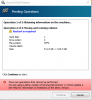
I changed the HDD capacity to 750GB but when I start the Windows 10 VM, Windows explorer still says '512' GB HDD, not 750GB or thereabouts.
Would anyone have any ideas on how to get around this?
Thanks.
I am using PD15 running a Windows 10 VM.
Both are using the latest updates.
I have a variable size VM. It is not fixed in size.
I wanted to change the size of the VM hard drive from 512GB to 750GB.
This Windows 10 VM is running on a Thunderbolt external SSD drive; it is not running on the primary HDD where the Mac OS is located.
I changed the HDD capacity to 750GB but when I start the Windows 10 VM, Windows explorer still says '512' GB HDD, not 750GB or thereabouts.
Would anyone have any ideas on how to get around this?
Thanks.