
Install the app
How to install the app on iOS
Follow along with the video below to see how to install our site as a web app on your home screen.
Note: This feature may not be available in some browsers.
You are using an out of date browser. It may not display this or other websites correctly.
You should upgrade or use an alternative browser.
You should upgrade or use an alternative browser.
Windows 11 Application Sharing
- Thread starter hs-2d
- Start date
SameekshaM
Bit poster
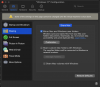
You can open a Windows application from macOS Finder by adding a folder containing all Windows programs in a Dock.
1. Click on the Parallels icon and choose Configure.
2. Choose Options --> Applications.
3. Enable Share Windows applications with Mac.
4. Choose Show Windows applications folder in Dock.
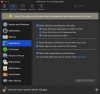
Another way is to enable 'Sharing Windows Programs' on the Parallels Desktop.
1. Click on the Parallels icon and choose Configure.
2. Choose Options --> Applications.
3. Enable Share Windows applications with Mac.
1. Click on the Parallels icon and choose Configure.
2. Choose Options --> Applications.
3. Enable Share Windows applications with Mac.
4. Choose Show Windows applications folder in Dock.
Another way is to enable 'Sharing Windows Programs' on the Parallels Desktop.
1. Click on the Parallels icon and choose Configure.
2. Choose Options --> Applications.
3. Enable Share Windows applications with Mac.
Hello! I was able to successfully share my Windows apps with Mac and I have the Windows 11 Applications folder on my dock, but I want to know how can I edit the content of the folder? For example, in my Windows 11 Applications folder I have a subfolder called Modern Apps. Inside that folder, the system automatically dumped there stuff like Power Bi and Power Automate. Also, all the Microsoft Office apps are sitting in the main Windows 11 Applications folder. I manually edited the content of the Windows 11 Applications folder but on the next boot, it came back to the default settings. Does anyone know how to properly edit the content of the Windows 11 Applications folder?
Hello. I tried to manually edit the folder's content in a Finder window. That works until I reboot the computer. Since this post, I have reached Parallel's support on this issue and they said that the content of the folder matches the structure of the Apps list in Windows 11, but in my case it doesn't resemble that at all. What a bummer.I imagine you do that on the Guest side, similar to editing the root start menu back in the pre-Win8 days.
What I was talking about was doing it on the Guest OS. Now, I've yet to Try on Win10 / Win11, but with the more classic menu in Windows, you can right click and customize the folder layouts. Again, things may not be the same on the newer OSes as their layouts don't appear to be very customizable due to the evolution of the Aero UI introduced in Win8.Hello. I tried to manually edit the folder's content in a Finder window. That works until I reboot the computer. Since this post, I have reached Parallel's support on this issue and they said that the content of the folder matches the structure of the Apps list in Windows 11, but in my case it doesn't resemble that at all. What a bummer.
What did you reinstall? Parallels, Windows, Parallels tools? I am having this issue too.nvm, reinstall helped
View attachment 20522