I have noticed 2 graphics corruption issues in Windows 8 with Parallels Desktop 8. I am running a macbook pro with 2 external monitors (via a matrox DualHead2go DVI splitter) which gives me an external 3840x1200 desktop in addition to the main panel on the macbook pro.
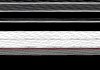
In windows 8, sometimes the background gets completely garbled - it will turn into a black and white type of static. Sometimes flipping back and forth between MAC/Windows will fix it. Sometimes I think it triggers when resuming from sleep.
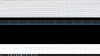
Also, I use Microsoft OneNote in my virtual machine, which has a screen shot function - Window+S key will do a screen shot that can copy to clip board. When doing this screen shot, sometimes the screen will go black or crazy corrupted and I can't see what graphics I'm clipping. The funny thing is, the actual captured screen looks completely normal, I just can't tell what I'm getting until the screen shot overlay is done. Again this doesn't always happen, just sometimes, and I can get it un-stuck by either rebooting the virtual or flipping back and forth and clicking different stuff / starting the full screen start menu / changing the background.
This has been happening for a year now, and I recently upgraded from a Macbook pro 2010 to a macbook pro 2013 with retina and it's still an issue. Has anyone else seen this?
In windows 8, sometimes the background gets completely garbled - it will turn into a black and white type of static. Sometimes flipping back and forth between MAC/Windows will fix it. Sometimes I think it triggers when resuming from sleep.
Also, I use Microsoft OneNote in my virtual machine, which has a screen shot function - Window+S key will do a screen shot that can copy to clip board. When doing this screen shot, sometimes the screen will go black or crazy corrupted and I can't see what graphics I'm clipping. The funny thing is, the actual captured screen looks completely normal, I just can't tell what I'm getting until the screen shot overlay is done. Again this doesn't always happen, just sometimes, and I can get it un-stuck by either rebooting the virtual or flipping back and forth and clicking different stuff / starting the full screen start menu / changing the background.
This has been happening for a year now, and I recently upgraded from a Macbook pro 2010 to a macbook pro 2013 with retina and it's still an issue. Has anyone else seen this?