Windows cannot access \\Mac\Home\Desktop

AndrewB17

Bit poster
Hi team,
Ever since I upgraded to Parallels Desktop for Mac version 12, I have been getting this error "Windows cannot access \\Mac\Home\Desktop":
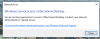
upload_2016-11-29_1-59-37.png

It seems to work OK if I untick the "Share Mac user folders with Windows" box:
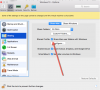
upload_2016-11-29_2-0-31.png

However, it would be nice to be able to use this feature.

I have read through the other links to this problem on the forum, and unsuccessfully tried:
- reinstalling Parallels tools (removing it completely as well, then installing from scratch)
- ticking the "Isolate Windows from Mac" option, and reinstalling Parallels Tools

Can't find anything else to try?

Thanks.
 
Getting the same error.
Windows cannot access <whatever mac file directory>
Error code: 0x80070035
Troubling that reloading is solving the issue.
Please post here if you get a solution and I'll do the same.

Mick
 
I just got support through Facebook messenger. I asked for help and it took about 15 minutes to respond. He had me reinstall Parallels Tools. The windows VM mac menu bar > Action > Install Parallels Tools. That mounted the parallels tool files to the windows VM. I started the install by clicking on the installation action when the file system was seen by windows. After install a reboot was required. Clicked restart in the popup. Everything worked after that.
Good luck!
Mick
 
I just got support through Facebook messenger. I asked for help and it took about 15 minutes to respond. He had me reinstall Parallels Tools. The windows VM mac menu bar > Action > Install Parallels Tools. That mounted the parallels tool files to the windows VM. I started the install by clicking on the installation action when the file system was seen by windows. After install a reboot was required. Clicked restart in the popup. Everything worked after that.
Good luck!
Mick
Glad to hear that! Feel free to reach us anytime.
 
Hi team,
Ever since I upgraded to Parallels Desktop for Mac version 12, I have been getting this error "Windows cannot access \\Mac\Home\Desktop":

View attachment 11916

It seems to work OK if I untick the "Share Mac user folders with Windows" box:

View attachment 11917

However, it would be nice to be able to use this feature.

I have read through the other links to this problem on the forum, and unsuccessfully tried:
- reinstalling Parallels tools (removing it completely as well, then installing from scratch)
- ticking the "Isolate Windows from Mac" option, and reinstalling Parallels Tools

Can't find anything else to try?

Thanks.
Try the steps given below
  1. Take a snapshot (Actions > Take Snapshot) while running a virtual machine.
  2. Uninstall Parallels Tools (Control Panel > Programs > Uninstall a program).
  3. Find and delete prl_fs.sys following C:\Windows\system32\drivers\prl_fs.sys.
  4. Reboot the virtual machine.
  5. Install Parallels Tools.
 
Back
Top