
Deac_Lancaster
Member
From time to time I unintentionally delete a file in Windows and want to restore it, but it's not in the vm's Recycle Bin. I don't know why or how to fix it.
I have Windows 7 with recycle bin set up to NOT permanently delete files but rather to send to the recycle bin.
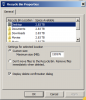
With delete confirmation turned off all of my deletes were permanently deleted, not sent to the recycle bin. I turned on delete confirmation and when I delete a file it asks "Do you want to delete the file permanently?" In either case, the file is permamently deleted which is not what I want. In the vm configuration for sharing I have "Merge Recycle Bin with Trash" turned off, though when it was turned on the behavior was the same.
I can see in Windows Explorer (File Manager) the Recycle Bin folder and also the $RECYCLE.BIN folder, the former is always empty and the latter has desktop.ini but none of the files I have sent to the Recycle Bin.
QUESTION: Is there another setting or way I can have a Windows delete send the files to the vm's Recycle Bin where I can restore them?
I have Parallels 11 and MacOS 10.10.5.
I have Windows 7 with recycle bin set up to NOT permanently delete files but rather to send to the recycle bin.
With delete confirmation turned off all of my deletes were permanently deleted, not sent to the recycle bin. I turned on delete confirmation and when I delete a file it asks "Do you want to delete the file permanently?" In either case, the file is permamently deleted which is not what I want. In the vm configuration for sharing I have "Merge Recycle Bin with Trash" turned off, though when it was turned on the behavior was the same.
I can see in Windows Explorer (File Manager) the Recycle Bin folder and also the $RECYCLE.BIN folder, the former is always empty and the latter has desktop.ini but none of the files I have sent to the Recycle Bin.
QUESTION: Is there another setting or way I can have a Windows delete send the files to the vm's Recycle Bin where I can restore them?
I have Parallels 11 and MacOS 10.10.5.