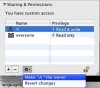
I added a 4 TB G drive connected by Thunderbolt cable to my Windows side on Parallels 9 on a New Mac Pro. When I tried to put data on the drive from windows, I get a message: You need Permission to Access this Drive.
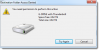
What do I need to do to allow access to the drive in Windows?
I never see this message when adding drives to a standard windows PC.
I understand I can attach this to the MAC side and have the drive available for both Mac and PC. I am going to use the hard drive for several SQL databases. Does having the Hard Drive directly connected to the PC vs Through the MAC have a performance impact?
What do I need to do to allow access to the drive in Windows?
I never see this message when adding drives to a standard windows PC.
I understand I can attach this to the MAC side and have the drive available for both Mac and PC. I am going to use the hard drive for several SQL databases. Does having the Hard Drive directly connected to the PC vs Through the MAC have a performance impact?
Last edited: