Windows May 2020 (2004) - Not Offered to Updating

Richard3

Member
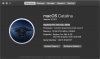
Why is Windows telling me the below? Is there a pending update to Parallels? I am on the current version, I keep looking for a update but none is offered. MacBook Pro (15-inch, 2016) - rest of details in screen capture below.

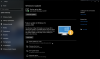
The Windows 10 May 2020 Update is on its way. We're offering this update to compatible devices, but your device isn't quite ready for it. Once your device is ready, you'll see the update available on this page. There's nothing you need to do at this time
upload_2020-6-10_7-51-16.png
 
Why is Windows telling me the below? Is there a pending update to Parallels? I am on the current version, I keep looking for a update but none is offered. MacBook Pro (15-inch, 2016) - rest of details in screen capture below.

The Windows 10 May 2020 Update is on its way. We're offering this update to compatible devices, but your device isn't quite ready for it. Once your device is ready, you'll see the update available on this page. There's nothing you need to do at this time

View attachment 16177
Share a screenshot of this message "The Windows 10 May 2020 Update is on its way. We're offering this update to compatible devices, but your device isn't quite ready for it. Once your device is ready, you'll see the update available on this page. There's nothing you need to do at this time" to check.
 
I also have that notice showing on the update page. Will anything be done about it or will we all be stuck on version 1909 forever?
 
Here's a screenshot of the Update Window with the message.

wzPb1QY
 

Attachments

  • UpdateWindow.png
    UpdateWindow.png
    77.6 KB · Views: 19
I ran into a similar issue where it came back with an error code. It's possible that there is a requisite update that hasn't been applied. You may want to run the Update Troubleshooter ("Troubleshoot" on the left menu) to figure out what's going on.
 
It certainly can run under Parallels OK. I have it installed in two VM's.
There was an update to the .NET framework that had to install first, and then an update to Adobe Flash that installed afterwards.
I'd had an issue only a few weeks before, so had run the Update Troubleshooter. Maybe this is why it worked OK.
 
Ran the update troubleshooter, no fault found, and the .NET framework has the May 12th update KB4552931 so I'm at a loss. Perhaps restoring from the media creation tool might be the way forward.
 
Something else to check as a long shot: If you have your ethernet connection set for "metered" things can get weird, such as Office updates not downloading at all. I have mine set because I like to know when updates are downloading and it gives me a way to approve it. However, I've also noticed some instances where things just don't show up, either.
 
Ran the Update Troubleshooter and it found nothing wrong. Checked the ethernet connection and it isn't set for "metered". Have all updates and the only thing offered is updates to Windows Defender definitions. At a loss as to what further to do.
 
Yes, Microsoft has a habit now of rolling things out at different times based on some 'unknown' decision like the machine serial number!...
Several of the previous feature updates actually installed at different times on machines, with the ones where it hadn't installed reporting non availability when they had exactly the same hardware as other machines that had already installed....
 
When I finally got 2004 installed via Windows Update I had to reboot at least three times before anything was even close to working right. And only then did the Tools Install finally kick in. So yeah, it was not a smooth process for me.
 
After I was shown the a.m. screen, I tried to install the May Update 2004 via "Windows Update assistent", and the update failed with a bsod "Page fault in non-paged area". I did this on am Mac Mini (late 2012) with 16 GB RAM and macOS 10.15.4 with Parallels 15.
On my MacBook Pro the windows update May 2004 worked without any problems.
 
After I was shown the a.m. screen, I tried to install the May Update 2004 via "Windows Update assistent", and the update failed with a bsod "Page fault in non-paged area". I did this on am Mac Mini (late 2012) with 16 GB RAM and macOS 10.15.4 with Parallels 15.
On my MacBook Pro the windows update May 2004 worked without any problems.
Let us know the amount of RAM allocated to Windows and how much free space in there in Windows C drive.
 
Back
Top