I've been trying to determine why one Windows 10 VM is consuming well over half of my 250GB overall storage. Initially, Parallels was reporting that 128.81 GB was used for "Snapshots," but when I went into Snapshot Manager, it indicated that no snapshots existed. I followed instructions found in these forums for getting rid of "phantom" snapshots and "merged" the snapshots, but that only shifted the 128.1 GB into the Windows VM.
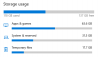
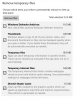
I then followed instructions for using the Windows storage system settings to deleted unneeded files, but that only freed up a few MB. Windows is now showing conflicting information about "temporary" files. It indicates there are nearly 18GB of temporary files, but when you dig into the details to delete them, it only says there are 32MB of temporary files. I'm at a loss and don't know how to reclaim unused disk space from my VM. It is currently using almost 158GB of disk space, which seems ridiculous, even for Windows.
I then followed instructions for using the Windows storage system settings to deleted unneeded files, but that only freed up a few MB. Windows is now showing conflicting information about "temporary" files. It indicates there are nearly 18GB of temporary files, but when you dig into the details to delete them, it only says there are 32MB of temporary files. I'm at a loss and don't know how to reclaim unused disk space from my VM. It is currently using almost 158GB of disk space, which seems ridiculous, even for Windows.