This is not entirely true. If you are on an iPad 3 or 4 your screen resolution is much higher then your PC most likely is. You can however increase the resolution after running the app by going to system preferences, going to display and selecting the desired resolution. I usually set a slightly higher resolution when testing the app out.
The iPad 1 and 2 and mini have a 1024x768 resolution. The iPad 3 and 4 have a 2048x1536 resolution.
On my iPad 2, Parallels Access can transmit a 1024x768 version of my Mac's 2560x1600 screen or my 2048x1536 screen at full frame rate. I'm only guessing that it's sending only 1024x768. If it's true, then Parallels Access must send a separate video stream for the magnifying glass.
Are you saying that on an iPad 3 or 4 with Retina display, Parallels Access will transmit a 2048x1536 screen? I don't think WiFi is good enough to transmit video of that size (4 times bigger) at full frame rate without some lossy compression.
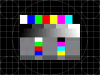
I generated a couple test screens using DisplayConfigX on my Power Mac G5 since it's a Power PC only app. My iPad sees the 1024x768 image perfectly (note the high frequency black and white vertical lines on the left side and horizontal lines on the right side).
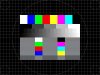
The 2048x1536 image is definitely scaled down on the iPad 2 but at least it's properly filtered (the high frequency lines are now solid gray - not solid white or solid black - also there's no Moiré patterns since the scale is exactly 1:2 in both dimensions). The magnifying glass also displays the lines as solid gray which is unexpected - I think it might be doing too much filtering or using a different scale than 1:1. The magnifying glass does well for small text but not those vertical and horizontal lines.
View the images on a 2048x1536 screen, full screen mode in Preview.app with the Get Info window visible (for the text). Use "Zoom to Fit" for the 1024x768 image. Then press the up and down arrow to switch between them.
Edit: I removed the 2048x1536 image since it was converted by the forum to a 1600x1200 jpeg file even though that doesn't actually save space over the original 2048x1536 png image. Actually the image can't be removed because Manage Attachments doesn't work. I think the 1024x768 image is still useful for testing retina display if you view it at 100% size on a 2048x1536 screen.