Windows XP Installation IRQ error message with Parallels 10

JosephG2

Bit poster
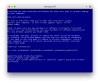
I am new to the mac and to Parallels. I got it installed fine but when I go to install windows it goes all the way to where it is installing drivers and I get the Blue Screen of Death. It says there is a conflict with and IRQ and it will be aborted. Screen shot attached.
I am not sure what I have to do to be able to install this. My goal is to install XP then to use my upgrade to Win 7 that I have.
Can anyone help me with this?

Also my service code shows and yet when I put a support ticket in I get an error that it is not the right code? Any ideas as well?

Thanks Joe
 

Attachments

  • Screen Shot 2015-08-15 at 9.40.34 AM.png
    Screen Shot 2015-08-15 at 9.40.34 AM.png
    46.9 KB · Views: 1
Hi JosephG2,
however, please follow the steps suggested below and let us know how it goes:
1. Open installation Wizard.
2. Click Install Windows or another OS from DVD or image file, then click Continue.
3. Please click on Locate Manually on the next screen & choose the source for Windows installation > Click continue.
4. Please un check "Express installation"& "This version requires a product key" > Click continue.
5. Follow the onscreen prompts to continue the installation and let us know how it goes.
 
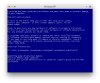
I just tried that and I get the same results. See attached screen shot.

What else can I do?
 

Attachments

  • Screen Shot 2015-08-15 at 2.02.59 PM.png
    Screen Shot 2015-08-15 at 2.02.59 PM.png
    46.9 KB · Views: 2
Hi,
when installing VM choose configure VM > in the opened config window go to hardware > cpu and change number to 1
after the installation is completed you will be able to switch it to any.
 
OK so how do I cancel or remove the one that will not install? And can you help me with where to change to one processor?

Thanks Joe
 
Back
Top