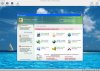
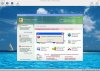
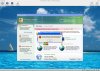
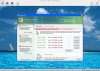
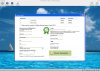
I need to remove and reinstall Windows XP on my virtual machine. I have Parallels Desktop for Mac 4.0. The problem is, I have a Microsoft "Privacy Center" support window on my desktop that doesn't allow me to get to my START files, or any other files on my desktop. When I try to close the window, I keep getting a little "THIS OPERATION IS PROHIBITED - PLEASE CHECK YOUR SETTINGS" window that pops up. (see screenshot attachment) The only thing that works on this window are several UPDATE buttons that takes you to a credit card info window to purchase updates for security services I never ordered in the first place. (see screenshot attachment) I have no idea how it got on my desktop when I booted up my virtual machine one day. My desktop is visible behind this window, but all the files on my desktop are invisible. (see screenshot attached) I tried removing and reinstalling Parallels Desktop, but it's still there. I tried calling Microsoft, but they charge for tech support. I'd like to try to avoid paying for Parallels Desktop phone support too, if possible. Can anyone tell me how to remove and reinstall Windows XP to get rid of this "Microsoft Privacy Settings Update window" when it won't let me see or get to the Windows desktop START button and the "my computer" files? Is some kind of virus, or "malware", or "scamware"?? Thank you.

Windows XP Reinstall Problem
- Thread starter PC Roe
- Start date