
Hi,
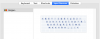
I installed Parallels Destktop 16 recently (16.1.2) on a MacBook Pro (Retina, 15-inch, Mid 2014) running Mac OS X Mojave (10.14.6 with latest updates) and in none of my Mac OS X Guest VM's I succeed to have the correct layout for my Mac Book Pro Belgian French keyboard (see screen shot: the "@" key in the upper left is replaced by "<"):
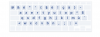
The real correct MBP keyboard (as seen in the host Mac OS X Keyboard Control Panel) is:
How can I fix that ?
Thanks,
Michel
I installed Parallels Destktop 16 recently (16.1.2) on a MacBook Pro (Retina, 15-inch, Mid 2014) running Mac OS X Mojave (10.14.6 with latest updates) and in none of my Mac OS X Guest VM's I succeed to have the correct layout for my Mac Book Pro Belgian French keyboard (see screen shot: the "@" key in the upper left is replaced by "<"):
The real correct MBP keyboard (as seen in the host Mac OS X Keyboard Control Panel) is:
How can I fix that ?
Thanks,
Michel
