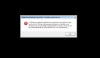
Hi, Take a snapshot of the virtual machine before following the below steps:
Please restart Windows > while restring please tap F8 to go to advanced repair options > choose repair Windows.
1, Select Command prompt in the options available.
2, You need to change the location to C:\Windows\System32 and then execute the below given commands and press Enter after each command: ren LogonUI.exe LogonUI.old
cd..
cd winsxs
dir *LogonUI*.*
cd amd64_microsoft...[the full path under which directory the file is present]
copy LogonUI.exe C:\Windows\System32
3, Reboot the computer and check if you are able to boot in to Windows.
Hi Karel, the XmlLite runtime is maintained by the Windows Update service. You cannot redistribute the Xmllite.dll file with your application. Please do Windows update and check how it works. Thanks!