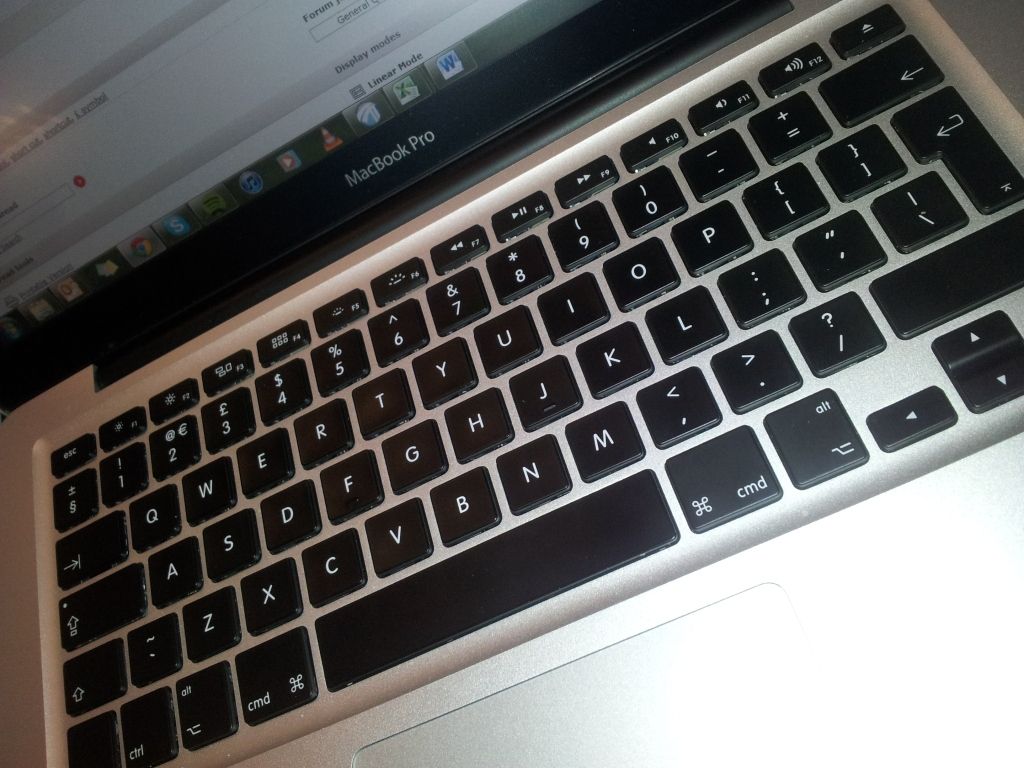
[I started to write this reply this morning after seeing AGrace's Today, 09:53 AM reply]
To AGrace : How did you upload and insert your image into the post ? The FAQ says :
"If you have uploaded an image as an attachment, you can click the arrow next to the 'Attachment Icon' and select it from the list."
As I haven't found that arrow, I used
, and after posting the reply I saw my screen captures in the reply, but today they have disappeared.
To both : It's more and more obscure : you guys have both a US keyboard with different behaviour ? On all keyboards I have used, the Shift key always displayed the character engraved above the numbers, so I thought it was the rule. I have just added the US keyboard in the Input Sources and noticed it's not the case on my MBP : if I open Textedit, switch to US keyboard and press Shift+3, it writes a # !
I have found this :
http://answers.yahoo.com/question/index?qid=20090203034620AAtWyaa
and tried to add the British keyboard. As uploaded screen captures disappear, I will only describe how to get there : Apple menu -> System Preferences -> (Hardware) Keyboard. If necessary click on the Keyboard tab, check Show Keyboard & Character Viewers in menu bar, click Input Sources…. In the list of countries, check British. The menulet in the menu bar allows now to switch the layout.
Now switch to the Win7 VM. You can notice that changing the keyboard from the Mac menu has no effect. The corresponding keyboard must also be installed in Windows.
Try to find your way in Control panel, Region and language, modify keyboards, tab Keyboard and language, button Modify the keyboards…, and see if you can add English (Great Britain).
I was able to do it with a Windows 7 Professional version. The Mac and Windows must be in sync. Then I switched to the British keyboard with the Mac menulet, also selected Show keyboard viewer to see how key presses are interpreted, opened Notepad and pressed Shift + 3, and there comes the £ !
Hope it works for you.