Missing menu-bar in Ubuntu 14.04 after install Parallels tools

PeterZhong

Bit poster
Hello,

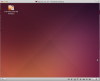
I have just finish install Ubuntu 14.04,I have my menu bar and every thing seems to be normal except for low resolution and no parallels tools and it all start when I finish install parallels tools and reboot the only see I can see is the Parallels Shared Folder.


My parallels desktop version is 9.0.24229 running on 10.9.2

I have tried many method including but they don't seems to work:
reinstall unity
reset unity
delete ~/.config and ~/.compiz

cd /etc/X11
sudo cp ./xorg.conf.04172014 ./xorg.conf
sudo reboot
cd ~/.config
rm -Rf *

The xorg.conf.04172014 is not existed however the xorg.conf.04232014 do exist, does that mean I get the newer version?
If this is caused by a newer version(I just downloaded today maybe that's why it's 04232014), is it possible to get a older version.

Regards,
Peter
 

Attachments

  • Ubuntu14.04.png
    Ubuntu14.04.png
    454.5 KB · Views: 129
Hello,

I have just finish install Ubuntu 14.04,I have my menu bar and every thing seems to be normal except for low resolution and no parallels tools and it all start when I finish install parallels tools and reboot the only see I can see is the Parallels Shared Folder.

My parallels desktop version is 9.0.24229 running on 10.9.2

Same problem here
 
I have the same problem. It looks like an OpenGL problem at the compiz level - when you try to start unity in the X session it complains about not being able to load opengl plugin and also prlcompiz plugin. Parallels Tools ship with prlcompiz plugin for various versions of compiz. However, Ubuntu 14.04 uses compiz version 0.9.11 for which there is no plugin from Parallels. These plugins are shipped in a binary form so Parallels has to produce it for the new compiz version. When can we expect the Parallels Tools to be updated to support Ubuntu 14.04?
 
I have the same problem. I notice however, that there is also another version (64-Mac-AMD) listed on the ubuntu download site, but the link is dead. I wonder if that is the problem.
 
Me too. Same as that screen shot in first message of this thread. Mac OS X 10.9.2 Mavericks, Parallels 9.0.24229.

As for the other download .iso file, the `64-bit Mac (AMD64)` is different only in that it has a workaround to an issue booting on certain kinds of firmware common to Macs and some other computers. See this answer on StackExchange AskUbuntu.com.

In contrast, installing Ubuntu 13.10 worked well*. So the nothing-on-desktop-but-"Parallels Shared Folder" problem seems to be only with 14.04.

*13.10 initially installs properly. But after doing all the suggested Ubuntu updates, most of the desktop becomes a black square with no windows ever able to appear. But that seems to be a different problem. I guess it is time for me to try VirtualBox instead of Parallels.
 
Last edited:
Folks can you please send please your /var/log/Xorg.0.log, /var/log/parallels-tools-install.log, /etc/X11/xorg.conf
I can not promise anything but probably we can find the important difference why it works for some and not for others.
 
Folks can you please send please your /var/log/Xorg.0.log, /var/log/parallels-tools-install.log, /etc/X11/xorg.conf
I can not promise anything but probably we can find the important difference why it works for some and not for others.

I have attached my files - I had the same exact problem. I tried reinstalling parallels tools after creating the missing directory /usr/share/hal/fdi/policy/20thirdparty (see the tools install log), but that didn't help.

View attachment Xorg.0.log.txt
View attachment parallels-tools-install.log.txt
View attachment xorg.conf.txt
 
Yes, the Unity plugin is enabled.

Here are the log files from my installation.

Here is what unity command prints out when you try to start it from within the X session:

Code:
test@silver-ubuntu:~$ unity
stop: Unknown job: unity-panel-service
compiz (core) - Info: Loading plugin: core
compiz (core) - Info: Starting plugin: core
start: Unknown job: unity-panel-service
compiz (core) - Info: Loading plugin: ccp
compiz (core) - Info: Starting plugin: ccp
compizconfig - Info: Backend     : gsettings
compizconfig - Info: Integration : true
compizconfig - Info: Profile     : unity

(process:7167): GLib-WARNING **: In call to g_spawn_sync(), exit status of a child process was requested but ECHILD was received by waitpid(). Most likely the process is ignoring SIGCHLD, or some other thread is invoking waitpid() with a nonpositive first argument; either behavior can break applications that use g_spawn_sync either directly or indirectly.
compiz (core) - Info: Loading plugin: composite
compiz (core) - Info: Starting plugin: composite
compiz (core) - Info: Loading plugin: resize
compiz (core) - Info: Starting plugin: resize
compiz (core) - Info: Loading plugin: regex
compiz (core) - Info: Starting plugin: regex
compiz (core) - Info: Loading plugin: vpswitch
compiz (core) - Info: Starting plugin: vpswitch
compiz (core) - Info: Loading plugin: commands
compiz (core) - Info: Starting plugin: commands
compiz (core) - Info: Loading plugin: snap
compiz (core) - Info: Starting plugin: snap
compiz (core) - Info: Loading plugin: place
compiz (core) - Info: Starting plugin: place
compiz (core) - Info: Loading plugin: imgpng
compiz (core) - Info: Starting plugin: imgpng
compiz (core) - Info: Loading plugin: move
compiz (core) - Info: Starting plugin: move
compiz (core) - Info: Loading plugin: mousepoll
compiz (core) - Info: Starting plugin: mousepoll
compiz (core) - Info: Loading plugin: compiztoolbox
compiz (core) - Info: Starting plugin: compiztoolbox
compiz (core) - Error: Plugin 'opengl' not loaded.

compiz (core) - Info: Loading plugin: session
compiz (core) - Info: Starting plugin: session
compiz (core) - Info: Loading plugin: workarounds
compiz (core) - Info: Starting plugin: workarounds
compiz (core) - Error: Plugin 'opengl' not loaded.
 

Attachments

I tried unity/compiz today again and I get the launcher and 3D (OpenGL) support. However it is extremely glitchy and windows are not displayed at all, so it got worse probably with latest updates of Ubuntu. So there seem to be some major issues and I recommend to either wait with the update or to use XFCE. JFYI, the gnome desktop is working better. It is really strange that the difference is so big for various installations and we all should hope for Parallels gets into it. I did check the logfiles but could not find a difference which might be the reason. I will attach my logfiles here just for reference.
 

Attachments

I found this answer that worked for me for 14.04-amd64: http://kb.parallels.com/en/121300. It seems that Parallels is aware of the issue but hasn't been responsive to forum threads, alas. That solution *didn't* work for me on a machine that I had messed around with with a few other solutions first, but it worked perfectly on a fresh install of 14.04. What I did was, in this order, install Ubuntu 14.04, run system updates, install Parallels tools, reboot, follow that Parallels answer, then reboot again, and all was well.
 
The KB article worked great. I believe the gsettings reset command did the trick. Thank you for posting the instructions!
 
I tried this, but the last command failed with this error:

(process:1827): dconf-WARNING **: failed to commit changese to dconf: Error spawing command line 'dbus-launch --autolaunch=9d71d83244a5389d50cee56c5367fa8a --binary-syntax --close-stderr': Child process exited with code 1
 
Here are the steps I followed to successfully upgrade my Ubuntu 13.10 VM to 14.04. I made liberal use of the snapshot feature in case something went wrong.

1. Installed the latest 13.10 software updates
2. Shutdown the VM and created a VM snapshot
3. Uninstalled Parallel Tools using the command, sudo /usr/lib/parallels-tools/install -r (see http://kb.parallels.com/en/117044) and rebooted the VM
4. Shutdown the VM and created another VM snapshot
5. Used Ubuntu's Software Updates to upgrade from 13.10 to 14.04 and rebooted the VM after the upgrade completed.
6. Shutdown the VM and created another VM snapshot
7. Installed Parallels Tools and rebooted the VM. This resulted in the issued discussed in this thread.
8. Followed the steps inside http://kb.parallels.com/en/121300 and rebooted. After this step, my 14.04 VM came up normally.
 
Last edited:
Starting with Control-Alt-F2 does not bring up the command line. Instead the usual password prompt comes up. Where do I go now?
 
Tried the KB fix, didn't appear to change anything after restart. However, after I figured out how to boot into cli mode on the macbook (cmd+alt+fn+f2), I went back in and reinstalled Parallels Tools....this worked for a few minutes.

Then I started losing windows: first the unity bar, then the desktop icons, and finally the terminal window I was using closed itself...lame
 
Last edited:
Back
Top