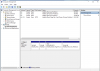
I created a new VM for Windows 7. Reinstalled Windows, Updated all fixes. The VM size was defaulted at 64GB. Everything was fine and windows 7 running properly.
Then I followed the instruction from Microsoft (GET WINDOWS 10 APP) and upgraded it to WIN 10. Everything was fine, Win10 installed and running properly. But soon I realized that I am running out of disk space. So I went to re-configure the HD as follows:
Under CONFIGURE, Hardware, Hard Disk 1, I resize it to 128GB and expanding checked.
But when I checked my C drive, it only shows 64GB and not much space left.
Will Parallel Desktop for MAC v 10 automatically expand it on the fly?
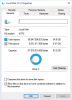
This is what I see when I looked at the Disk Mgmt under Administration Tools in WIN 10
I see the 64GB partition. What is the other 64GB Healthy (Recovery Partition)?
I cant delete that partition?
Please help get to increase the already resize VM disk.
Thanks
Then I followed the instruction from Microsoft (GET WINDOWS 10 APP) and upgraded it to WIN 10. Everything was fine, Win10 installed and running properly. But soon I realized that I am running out of disk space. So I went to re-configure the HD as follows:
Under CONFIGURE, Hardware, Hard Disk 1, I resize it to 128GB and expanding checked.
But when I checked my C drive, it only shows 64GB and not much space left.
Will Parallel Desktop for MAC v 10 automatically expand it on the fly?
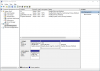
This is what I see when I looked at the Disk Mgmt under Administration Tools in WIN 10
I see the 64GB partition. What is the other 64GB Healthy (Recovery Partition)?
I cant delete that partition?
Please help get to increase the already resize VM disk.
Thanks
 partition to the 200GB it needs to be.