
So, I went crazy and bought a Dell UP2715K - that's a 5K monitor. Colors in OSX are OK, however colors in Windows VMs (Windows 10) are overly saturated. When I say overly, I mean it's an unbearable 2x increase in staturation. The red "x" window close button (i.e. when you hover the mouse over the "x" close button) is super-bright red.
I initially had a 4K monitor i.e. Dell P2415Q, and everything looked as expected (i.e. as they look on my Macbook Pro Retina). On this monitor, colors in Windows VM (and only there) are completely crazy.
I would appreciate an insight on how to fix this...
Here's how it looks (a screenshot with Windows Explorer, pay attention to the red close button and to the blue "free space" bars):
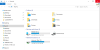
And here's how it should look:
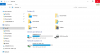
I initially had a 4K monitor i.e. Dell P2415Q, and everything looked as expected (i.e. as they look on my Macbook Pro Retina). On this monitor, colors in Windows VM (and only there) are completely crazy.
I would appreciate an insight on how to fix this...
Here's how it looks (a screenshot with Windows Explorer, pay attention to the red close button and to the blue "free space" bars):
And here's how it should look:
Last edited:


