
Install the app
How to install the app on iOS
Follow along with the video below to see how to install our site as a web app on your home screen.
Note: This feature may not be available in some browsers.
You are using an out of date browser. It may not display this or other websites correctly.
You should upgrade or use an alternative browser.
You should upgrade or use an alternative browser.
Parallels 12.1.3 takes over 5 minutes to start!!!
- Thread starter viola
- Start date

Hi, do you have any external devices connected to your virtual machine directly? If so, please disconnect it from the virtual machine(Not from Mac side) and check if the issue persists or not. Also, could you please create a screenshot of the Activity monitor and send it to us?
No, this machine doesn't have anything connected and honestly the behavior is happening BEFORE even getting the Control Center up (as noted in my first post). So it's something BEFORE dealing with the virtual machines individually! I've been living with this for a couple months now. Seems like it started with 10.12.0. 'prl_disp_service' hangs each time:
Screenshots:
Screenshots:
- https://cl.ly/1C422r0j0R3h
- https://cl.ly/1w123V3W4701
- Parallels sample: https://cl.ly/0Q0h381p460S
- https://cl.ly/3c1a0X0R082X
- prl_disp_service sample: https://cl.ly/1y2o0U0P0a0q
Hi, please try to create test user account on Mac OS X and let us know how it works:
1.Find the virtual machine file:
* start Parallels Desktop
*in the menu bar at the top go to Window > Virtual machines list
*right-click on the virtual machine name > Show in Finder
2.Change the permissions:
*right-click on WindowsXX.pvm > Get Info
* in the field 'Sharing & Permissions' please change to 'Read & Write' for all users in the list (including 'everyone' and 'staff')
3.Move your virtual machines to the /Users/Shared/Parallels folder
4.Create new test Administrator user account:
*go to Finder > Applications > System Preferences > Users & Groups
*click on '+' to create a new user and called him Test
*in the field New Account choose Administrator
*set any name with simple password (e.g. 123) and click 'Create User'
*check the option Allow user to administer this computer
5. Log off from your current user account (Apple logo > Log out)
6. Log in the new Test user account
7. Launch Parallels Desktop and the virtual machine (you may need to choose the way to the virtual machine, it is /Users/Shared/Parallels)
1.Find the virtual machine file:
* start Parallels Desktop
*in the menu bar at the top go to Window > Virtual machines list
*right-click on the virtual machine name > Show in Finder
2.Change the permissions:
*right-click on WindowsXX.pvm > Get Info
* in the field 'Sharing & Permissions' please change to 'Read & Write' for all users in the list (including 'everyone' and 'staff')
3.Move your virtual machines to the /Users/Shared/Parallels folder
4.Create new test Administrator user account:
*go to Finder > Applications > System Preferences > Users & Groups
*click on '+' to create a new user and called him Test
*in the field New Account choose Administrator
*set any name with simple password (e.g. 123) and click 'Create User'
*check the option Allow user to administer this computer
5. Log off from your current user account (Apple logo > Log out)
6. Log in the new Test user account
7. Launch Parallels Desktop and the virtual machine (you may need to choose the way to the virtual machine, it is /Users/Shared/Parallels)
That's great! please follow the below steps and keep us posted on your progress:Paul, this is very interesting. That seems to help and it seems to start without issues under a fresh user. What do I need to do to this account in order to make things work properly again?
1. Uninstall Parallels Desktop 12 as suggested in the article
2. Perform first aid on your Mac hard disk ( /Applications/Utilities/ -> Select Macintosh HD on the left of the Disk Utility window -> then click the First Aid tab ).
3. Download Parallels Desktop 12 for Mac and reinstall Parallels Desktop 12 as suggested in this article
That's great! please follow the below steps and keep us posted on your progress:
1. Uninstall Parallels Desktop 12 as suggested in the article
2. Perform first aid on your Mac hard disk ( /Applications/Utilities/ -> Select Macintosh HD on the left of the Disk Utility window -> then click the First Aid tab ).
3. Download Parallels Desktop 12 for Mac and reinstall Parallels Desktop 12 as suggested in this article
I don't see a link to the article you note? Is it this one? I am concerned since I would have thought it would be more thorough in cleaning up user configuration files in ~/Library/Preferences, etc.!
So I went ahead and did as the article instructed, but ran it through AppCleaner (that other software devs recommend, such as Cocoatech) and removed all support files. After a reboot, I reinstalled Parallels, but unfortunately I'm hitting the enormous startup time problem still with my own account. Again, it's taking like 5 minutes just to draw the Control Center!
Also, when I finally get it to come up and I try to go into the settings of a virtual machine, it hangs on these screens forever with the spinner in front of the greyed out dialogue:
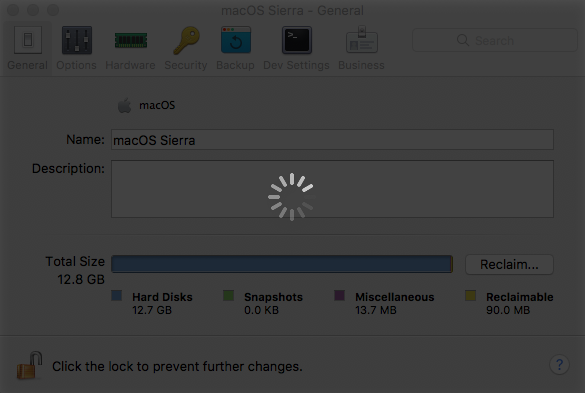
When it finally did come up, it came up with the old VMs that I had previously, so I have to believe that I did not remove all of the configuration files and that the one(s) that was / were left is the one that is causing the trouble... What would that be?
Also, when I finally get it to come up and I try to go into the settings of a virtual machine, it hangs on these screens forever with the spinner in front of the greyed out dialogue:
When it finally did come up, it came up with the old VMs that I had previously, so I have to believe that I did not remove all of the configuration files and that the one(s) that was / were left is the one that is causing the trouble... What would that be?
Last edited:
Will try to reply this way to see if it will catch attention too...That's great! please follow the below steps and keep us posted on your progress:
1. Uninstall Parallels Desktop 12 as suggested in the article
2. Perform first aid on your Mac hard disk ( /Applications/Utilities/ -> Select Macintosh HD on the left of the Disk Utility window -> then click the First Aid tab ).
3. Download Parallels Desktop 12 for Mac and reinstall Parallels Desktop 12 as suggested in this article

Maria@Parallels
Problem solver
Let us know the results pleaseWill try to reply this way to see if it will catch attention too...
I did let you know the results above, please review the thread and you will see that I am in a holding pattern waiting for input from you...Let us know the results please

We're sorry for the delay response. Please follow the below steps and let us know how it goes:I did let you know the results above, please review the thread and you will see that I am in a holding pattern waiting for input from you...
1. Uninstall Parallels Desktop 12 by following below command:
- Quit Parallels Desktop.
- Launch Terminal application (Applications > Utilities > Terminal).
- Execute the following commands separately (one by one):
sudo su
NOTE: You will be prompted to enter your Mac password after executing the first command. Due to security measures you won't be able to see the password itself, just type it in and hit return/Enter.
rm -rfd /System/Library/Extensions/prl*
rm -rfd ~/Library/Preferences/com.parallels*
rm -rfd ~/Library/Preferences/parallels
rm -rfd ~/Library/Parallels
rm -rfd ~/Library/Saved\ Application\ State/com.parallels.desktop.console.savedState
rm -rfd /Library/logs/parallels.log
rm -rfd /Library/Preferences/Parallels/
rm -rfd /private/var/db/Parallels/
rm -rfd /private/var/.parallels_swap
rm -rfd /private/var/db/receipts/'com.parallels*'
rm -rfd /private/var/db/Parallels/Stats
rm -rfd /private/var/root/library/preferences/com.parallels.desktop.plist
rm -rfd ~/Applications\ \(Parallels\)/
rm -rfd /Applications/Parallels\ Desktop.app/
- Restart the Mac.
- Install Parallels Desktop again.
[/FONT]

Hemnath@Parallels
Parallels Support
You're welcome. Glad to know it worked.That appears to have helped. Thank you.
Chances are that corruption on the Mac hard disk (should there be any in your case) might have caused this problem. Disk corruption typically affects software applications - this applies for any platform. There might be software applications specifically designed for detecting disk corruption, but such a feature, on a conventional level, cannot be implemented in just about any software program, least of all Parallels Desktop. I'd suggest that you contact Apple support and check for disk errors on your Mac machine.It seems that Parallels needs to work on detecting some corruptions or something better...
Last edited: