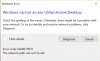
"Windows can't find a computer or device named "Mac"

LarryF2

Bit poster
I upgraded from Parallels 12 to 13 today.
Upon opening Windows I received an error message:
"Windows cannot access //Mac/Home/Desktop"
The Windows Network Diagnostics then indicated:
"Windows can't find a computer or device named "Mac"

I'm at a loss as to how to proceed since I am unable to access any of my Windows applications.

Assistance would be greatly appreciated.

Thank you
 
I'm having exactly the same problem.
Upgraded to Parallels 13 on late-2015 iMac running macOS Sierra 10.12.6 with a Windows 10 VM.
The upgrade has essentially disabled my Windows installation.
Parallels Toolbox Version 2.0.0 (1192) suggests that it is the latest version.
2017-08-24_08-57-35.jpg
 
Last edited:
Same problem here. Reinstalled WIN10, network connection problems solved.
Now new problem "Windows cannot access //Mac/Home/Desktop"
 
Same problem for me. I upgraded from Parallels 12 to 13 on an early-2015 Macbook Pro with 10.12.6 SIerra and Windows 10 VM. Worked fine on 12, no I
a)"Windows cannot access //Mac/Home/Desktop" and tried all the KB fixes and nothing works.
b) can't get Coherence to work. All my Mac Icon's do no longer function.
c) Windows MS-Office 365 latest version does not work - can't find files.
Dead in the water. Any ideas?
 
I contacted Support last evening and they referred me to article # 115026.
I tried Method 1 of the resolution recommendations but I could not access the "control panel" of the virtual machine. That option is consistently grayed out.
Unfortunately, Method 2 involves the Terminal which is beyond my level of comfort and confidence.
I too am "dead in the water."

Further ideas would be welcome.
 
I personally spoke with an individual at Technical Support who remotely took control of my computer and resolved the problem. I am very grateful for the assistance provided by Technical Support.
I hope that the other Forum users obtain a prompt resolution of this issue.
 
I think this message indicates that Parallels Tools is not installed. (If you have installed PT, be sure to restart windows).
If you need to install Parallels Tools, you can do this from the Actions Menu.
 
Thanks Larry, I also called tech support and the person remotely took control and resolved the problem. Issue was with the Parallel's Tools not installing properly. They needed to remove it from Windows registry manually as well as turn off my Firewall/Virus software and do a few things to allow it to install cleanly again. All fixed and working well now just as before. And it does appear to load files faster. Thank you to the tech support for quick response and resolution.
 
Thanks Larry, I also called tech support and the person remotely took control and resolved the problem. Issue was with the Parallel's Tools not installing properly. They needed to remove it from Windows registry manually as well as turn off my Firewall/Virus software and do a few things to allow it to install cleanly again. All fixed and working well now just as before. And it does appear to load files faster. Thank you to the tech support for quick response and resolution.
Yes, you are right. This issue only occurs most of the time if Parallels Tools are not installed correctly. We are glad that now the issue is resolved. Please reach us anytime for support.
 
I think this message indicates that Parallels Tools is not installed. (If you have installed PT, be sure to restart twindows).
If you need to install Parallels Tools, you can do this from the Actions Menu.
Glad to see your active participation. Yes, installing Parallels Tools will resolve the issue.
 
I personally spoke with an individual at Technical Support who remotely took control of my computer and resolved the problem. I am very grateful for the assistance provided by Technical Support.
I hope that the other Forum users obtain a prompt resolution of this issue.
Glad that the issue is resolved now. Feel free to reach us anytime for support.
 
Back
Top