large difference between c-drive and vm size

ChrisTom

Bit poster
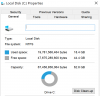
I run a number of different Windows 10 VMs with expanding disks, and the bloat (difference between the c-drive and v-hdd size) varies quite a lot. Here are two examples (No snapshots):
Low bloat: c-drive 19.5GB, Total size in Config/General: 20.9GB, PVM: 22.4GB
High bloat: c-drive 19.3GB, Total size in Config/General: 24.1GB, PVM: 25.87GB

As I run quite a lot of VM for different users and clone them for new installations, any bloat makes backups and limited SSD space is a real pain. I have tried to compress and optimise everything I can think of, in Windows 10, and in Parallels Desktop, with Reclaim and the extra 3GB of bloat is really annoying me in some of these.

Please can someone tell me what it is and how I can manage it down?
Most of the VMs are run in PD11, but I tested a high bloat one in PD13, and also found I could not reduce it.
Thanks
 
PVM size is the summ of various VM files. It contains HDD (c-drive as usual), snapshots (if any), suspend state (RAM, devices state).

If you do not have snapshots, VM is not in suspended state then PVM size should be similar (not equal) to c-drive.
 
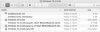
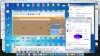
Yes. This is what I would expect. But it is not what is happening. Here is one I have moved over to a PD13 environment.
 

Attachments

  • Screen Shot 2017-11-15 at 13.01.35.png
    Screen Shot 2017-11-15 at 13.01.35.png
    46.9 KB · Views: 20
  • Screen Shot 2017-11-15 at 13.00.28.png
    Screen Shot 2017-11-15 at 13.00.28.png
    127.3 KB · Views: 19
I see. It seems there is unused space inside virtual HDD what occupy disk space in Mac. Lets try to do the following:

1) Open Windows 10 VM and run it
2) From File menu in PD choose Check Disk
3) Then operation completes click on HDD icon in the VM window title bar and select Reclaim Disk Space...

Let me know the results.
 
Hi, I had already done all this, but did it again. And then W10 update 1709 landed and I had to start again, having done the disk clean-up.

But the result was no benefit other than 100mb.
 
I would definitely appreciate some guidance in this area. My pvm started at about 80GB when I first installed it, and is now at 206GB. The C-drive is only 60GB. This is on a MacBook Pro with 512GB - it's getting crowded. How can I determine what is taking up so much space, and whether I can reduce the space somehow. I do have snapshots enabled, and the disk save in configuration is set at 256 GB.
 
JosephL6, this is the answer to your question. SmartGuard uses place to store the data. It depends on data you have stored on the disk between the SmartGuard sessions.
 
I thought I would test your theory by deleting one of the snapshots. What happened is even stranger. After I deleted the snapshot, the pvm in control center decreased by 15GB, but the space taken up on my HDD INCREASED by about 30GB. I have used the Parallel "clean drive" utility, and there are no large files visible to me, suggesting it is a Parallels file. I am going to run out of space son. Do you have any idea to clearly determine what files are taking up so much space?
 
JosephL6, let me explain how SmartGuard and Snaphots work. SmartGuard do snapshots on schedule by settings you set in its parameters. Thus SpartGuard just a set of snapshots. The more snapshots the more disk spaces occupies by it. You can turn off SmartGuard and get the real disk size of your virtual machine.
 
I have a VM on Parallels 11 that measures 379GB (221GB of used space, the rest is free space) within Windows.
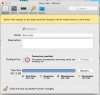
SmartGuard is NOT on. Snapshots are less than 4GB of space. PARALLELS Window Size.jpg

- I had to do a restore a year ago from a Time Machine backup and the VM size in OS X grew to 449GB.
- I had to do another restore last week and this time the VM has grown to an unwieldy 600GB !!
PARALLELS size of VM.jpg
I have tried compress, reclaim space, Free Up Disk Space but I still cannot figure out what is causing all of the extra 221GB of headroom. The size seems to coincide with the size of the used space within the Windows HDD.
Since there are snapshots, I cannot edit the size of the VM.
Any ideas what could be causing all of this bloat and how to decrease the size of the VM back to under 400GB?
 
I have a VM on Parallels 11 that measures 379GB (221GB of used space, the rest is free space) within Windows.
SmartGuard is NOT on. Snapshots are less than 4GB of space. View attachment 13650

- I had to do a restore a year ago from a Time Machine backup and the VM size in OS X grew to 449GB.
- I had to do another restore last week and this time the VM has grown to an unwieldy 600GB !!
View attachment 13651
I have tried compress, reclaim space, Free Up Disk Space but I still cannot figure out what is causing all of the extra 221GB of headroom. The size seems to coincide with the size of the used space within the Windows HDD.
Since there are snapshots, I cannot edit the size of the VM.
Any ideas what could be causing all of this bloat and how to decrease the size of the VM back to under 400GB?
Hi @CristianA2, please start the VM, boot to Windows and send us a technical report via Help menu > Send Technical Data...
Please post the report ID here.
 
Hi Dmitry,
Here is the output. Thanks.

total 579696

drwx--x--x@ 19 MARAGATO staff 646 Feb 23 09:32 .

drwxr-xr-x 4 MARAGATO staff 136 Mar 30 2016 ..

-rw-r--r-- 1 MARAGATO staff 72000 Feb 21 14:58 2018-02-21-145801.dmp

-rw-r--r-- 1 MARAGATO staff 76616 Feb 21 15:00 2018-02-21-150036.dmp

-rwx------ 1 MARAGATO staff 26796 Feb 23 09:32 config.pvs

-rwx------ 1 MARAGATO staff 26796 Feb 23 09:32 config.pvs.backup

-rw------- 1 MARAGATO staff 1474560 Mar 30 2016 floppy.fdd

-rw-r--r-- 1 MARAGATO staff 25021876 Feb 21 15:00 monitor.dmp

-rw-rw-rw- 1 MARAGATO staff 1545438 Feb 23 15:07 parallels.log

drwx--x--x 14 MARAGATO staff 476 Feb 21 15:00 Snapshots

-rw------- 1 MARAGATO staff 1107 Feb 21 15:00 Snapshots.xml

drwxr-xr-x@ 3 MARAGATO staff 102 Feb 20 18:30 Sony Vaio.app

-rw-r--r-- 1 MARAGATO staff 48832 Feb 23 15:12 statistic.log

-rw-r--r-- 1 MARAGATO staff 0 Feb 23 09:32 vm.lock

-rw-r--r-- 1 MARAGATO staff 34979 Feb 23 15:12 VmInfo.pvi

drwx--x--x@ 19 MARAGATO staff 646 Feb 23 09:32 Windows 7-0.hdd

drwxr-xr-x 4 MARAGATO staff 136 Feb 23 09:32 Windows Disks

-rw-r--r--@ 1 MARAGATO staff 0 Feb 23 09:32 {1e2db662-98ff-483e-8f46-dd9932b1b4eb}.mem

-rw-rw-rw- 1 MARAGATO staff 268435456 Feb 23 09:32 {1e2db662-98ff-483e-8f46-dd9932b1b4eb}.mem.sh


/Volumes/4TB Seagate Backup Plus Drive/PARALLELS/Sony Vaio.pvm/Snapshots:

total 10230192

drwx--x--x 14 MARAGATO staff 476 Feb 21 15:00 .

drwx--x--x@ 19 MARAGATO staff 646 Feb 23 09:32 ..

-rw------- 1 MARAGATO staff 16384 Feb 21 15:00 {0e0e3d98-52a6-443e-be3e-b4ed2a1bcd1d}.dat

-rw------- 1 MARAGATO staff 1233965120 Feb 21 15:00 {0e0e3d98-52a6-443e-be3e-b4ed2a1bcd1d}.mem

-rw------- 1 MARAGATO staff 21903 Feb 21 15:00 {0e0e3d98-52a6-443e-be3e-b4ed2a1bcd1d}.png

-rw------- 1 MARAGATO staff 26859 Feb 21 15:00 {0e0e3d98-52a6-443e-be3e-b4ed2a1bcd1d}.pvc

-rw------- 1 MARAGATO staff 32086 Feb 21 15:00 {0e0e3d98-52a6-443e-be3e-b4ed2a1bcd1d}.pvi

-rw------- 1 MARAGATO staff 2562432 Feb 21 15:00 {0e0e3d98-52a6-443e-be3e-b4ed2a1bcd1d}.sav

-rw------- 1 MARAGATO staff 16384 Feb 20 16:29 {c8f25601-61da-4c7b-9271-7a87daa0d02e}.dat

-rw------- 1 MARAGATO staff 3997675584 Feb 20 16:29 {c8f25601-61da-4c7b-9271-7a87daa0d02e}.mem

-rw------- 1 MARAGATO staff 887152 Feb 20 16:29 {c8f25601-61da-4c7b-9271-7a87daa0d02e}.png

-rw------- 1 MARAGATO staff 26859 Feb 20 16:29 {c8f25601-61da-4c7b-9271-7a87daa0d02e}.pvc

-rw------- 1 MARAGATO staff 32088 Feb 20 16:29 {c8f25601-61da-4c7b-9271-7a87daa0d02e}.pvi

-rw------- 1 MARAGATO staff 2563568 Feb 20 16:29 {c8f25601-61da-4c7b-9271-7a87daa0d02e}.sav


/Volumes/4TB Seagate Backup Plus Drive/PARALLELS/Sony Vaio.pvm/Sony Vaio.app:

total 0

drwxr-xr-x@ 3 MARAGATO staff 102 Feb 20 18:30 .

drwx--x--x@ 19 MARAGATO staff 646 Feb 23 09:32 ..

drwxr-xr-x 6 MARAGATO staff 204 Feb 20 18:30 Contents


/Volumes/4TB Seagate Backup Plus Drive/PARALLELS/Sony Vaio.pvm/Sony Vaio.app/Contents:

total 32

drwxr-xr-x 6 MARAGATO staff 204 Feb 20 18:30 .

drwxr-xr-x@ 3 MARAGATO staff 102 Feb 20 18:30 ..

-rw-r--r-- 1 MARAGATO staff 1613 Feb 20 18:30 Info.plist

drwxr-xr-x 3 MARAGATO staff 102 Feb 20 18:30 MacOS

-rw-r--r-- 1 MARAGATO staff 8 Feb 20 18:30 PkgInfo

drwxr-xr-x 7 MARAGATO staff 238 Feb 20 18:30 Resources


/Volumes/4TB Seagate Backup Plus Drive/PARALLELS/Sony Vaio.pvm/Sony Vaio.app/Contents/MacOS:

total 96

drwxr-xr-x 3 MARAGATO staff 102 Feb 20 18:30 .

drwxr-xr-x 6 MARAGATO staff 204 Feb 20 18:30 ..

-rwxrwxr-x 1 MARAGATO staff 42740 Feb 20 18:30 WinAppHelper


/Volumes/4TB Seagate Backup Plus Drive/PARALLELS/Sony Vaio.pvm/Sony Vaio.app/Contents/Resources:

total 304

drwxr-xr-x 7 MARAGATO staff 238 Feb 20 18:30 .

drwxr-xr-x 6 MARAGATO staff 204 Feb 20 18:30 ..

-rw-r--r-- 1 MARAGATO staff 72987 Feb 20 18:30 AppBigIcon.png

-rw-r--r-- 1 MARAGATO staff 156 Feb 20 18:30 AppParams.pva

drwxr-xr-x 4 MARAGATO staff 136 Feb 20 18:30 English.lproj

-rw-r--r-- 1 MARAGATO staff 36049 Feb 20 18:30 my_documents.icns

-rw-r--r-- 1 MARAGATO staff 29919 Feb 20 18:30 WinAppHelper.icns


/Volumes/4TB Seagate Backup Plus Drive/PARALLELS/Sony Vaio.pvm/Sony Vaio.app/Contents/Resources/English.lproj:

total 16

drwxr-xr-x 4 MARAGATO staff 136 Feb 20 18:30 .

drwxr-xr-x 7 MARAGATO staff 238 Feb 20 18:30 ..

-rw-r--r-- 1 MARAGATO staff 177 Feb 20 18:30 InfoPlist.strings

drwxr-xr-x 3 MARAGATO staff 102 Feb 20 18:30 main.nib


/Volumes/4TB Seagate Backup Plus Drive/PARALLELS/Sony Vaio.pvm/Sony Vaio.app/Contents/Resources/English.lproj/main.nib:

total 16

drwxr-xr-x 3 MARAGATO staff 102 Feb 20 18:30 .

drwxr-xr-x 4 MARAGATO staff 136 Feb 20 18:30 ..

-rw-r--r-- 1 MARAGATO staff 1501 Feb 20 18:30 objects.xib


/Volumes/4TB Seagate Backup Plus Drive/PARALLELS/Sony Vaio.pvm/Windows 7-0.hdd:

total 1352634432

drwx--x--x@ 19 MARAGATO staff 646 Feb 23 09:32 .

drwx--x--x@ 19 MARAGATO staff 646 Feb 23 09:32 ..

-rw------- 1 MARAGATO staff 6606 Feb 21 15:00 DiskDescriptor.xml

-rw------- 1 MARAGATO staff 6196 Feb 21 14:52 DiskDescriptor.xml.Backup

-rw------- 1 MARAGATO staff 0 Oct 11 2015 Windows 7-0.hdd

-rw------- 1 MARAGATO staff 35449208832 Nov 30 2015 Windows 7-0.hdd.0.{06f6a67c-4257-4d2a-a94c-81154acfa652}.hds

-rw------- 1 MARAGATO staff 68261249024 Feb 21 15:00 Windows 7-0.hdd.0.{0e0e3d98-52a6-443e-be3e-b4ed2a1bcd1d}.hds

-rw------- 1 MARAGATO staff 15255732224 Dec 1 2015 Windows 7-0.hdd.0.{24e6def9-6322-4014-9a01-8c26541c1b39}.hds

-rw------- 1 MARAGATO staff 20208156672 Nov 30 2015 Windows 7-0.hdd.0.{2fe9b160-37b3-40ea-acfe-7af39aa3a385}.hds

-rw------- 1 MARAGATO staff 51003785216 Feb 20 18:38 Windows 7-0.hdd.0.{3c02db74-62cb-4e25-9893-10bd973d19de}.hds

-rw------- 1 MARAGATO staff 6312427520 Dec 1 2015 Windows 7-0.hdd.0.{3ffcdd10-a4a3-47be-8d86-8f92641af309}.hds

-rw------- 1 MARAGATO staff 2831155200 Dec 1 2015 Windows 7-0.hdd.0.{4a3ee71e-bebd-4e5b-a67c-a390a220e996}.hds

-rw------- 1 MARAGATO staff 94162124800 Mar 30 2016 Windows 7-0.hdd.0.{5867e484-fc86-4b47-a4f8-12da1780d187}.hds

-rw------- 1 MARAGATO staff 6111100928 Feb 23 16:04 Windows 7-0.hdd.0.{5fbaabe3-6958-40ff-92a7-860e329aab41}.hds

-rw------- 1 MARAGATO staff 199273480192 Nov 30 2015 Windows 7-0.hdd.0.{67392513-89be-46ba-ae4c-db1836061b44}.hds

-rw------- 1 MARAGATO staff 814743552 Mar 30 2016 Windows 7-0.hdd.0.{75bba400-3b3b-4a67-8d50-62001b6e88f8}.hds

-rw------- 1 MARAGATO staff 187258896384 Feb 20 16:29 Windows 7-0.hdd.0.{c8f25601-61da-4c7b-9271-7a87daa0d02e}.hds

-rw------- 1 MARAGATO staff 5606735872 Dec 1 2015 Windows 7-0.hdd.0.{eec5dfaa-667f-4efa-bee4-c580bdcaa420}.hds

-rw------- 1 MARAGATO staff 11664 Feb 23 09:32 Windows 7-0.hdd.drh


/Volumes/4TB Seagate Backup Plus Drive/PARALLELS/Sony Vaio.pvm/Windows Disks:

total 32

drwxr-xr-x 4 MARAGATO staff 136 Feb 23 09:32 .

drwx--x--x@ 19 MARAGATO staff 646 Feb 23 09:32 ..

lrwxr-xr-x 1 MARAGATO staff 10 Feb 23 09:32 C -> /Volumes/C

lrwxr-xr-x 1 MARAGATO staff 10 Feb 22 16:15 E -> /Volumes/E
 
Thank you, @CristianA2. It appears that you have a dozen of snapshots for your virtual machine, and some of them are pretty large:
-rw------- 1 MARAGATO staff 35449208832 Nov 30 2015 Windows 7-0.hdd.0.{06f6a67c-4257-4d2a-a94c-81154acfa652}.hds - 35 Gb
-rw------- 1 MARAGATO staff 68261249024 Feb 21 15:00 Windows 7-0.hdd.0.{0e0e3d98-52a6-443e-be3e-b4ed2a1bcd1d}.hds - 68 Gb
-rw------- 1 MARAGATO staff 15255732224 Dec 1 2015 Windows 7-0.hdd.0.{24e6def9-6322-4014-9a01-8c26541c1b39}.hds - 15 Gb
-rw------- 1 MARAGATO staff 20208156672 Nov 30 2015 Windows 7-0.hdd.0.{2fe9b160-37b3-40ea-acfe-7af39aa3a385}.hds - 20 Gb
-rw------- 1 MARAGATO staff 51003785216 Feb 20 18:38 Windows 7-0.hdd.0.{3c02db74-62cb-4e25-9893-10bd973d19de}.hds - 51 Gb
-rw------- 1 MARAGATO staff 6312427520 Dec 1 2015 Windows 7-0.hdd.0.{3ffcdd10-a4a3-47be-8d86-8f92641af309}.hds - 6 Gb
-rw------- 1 MARAGATO staff 2831155200 Dec 1 2015 Windows 7-0.hdd.0.{4a3ee71e-bebd-4e5b-a67c-a390a220e996}.hds - 3 Gb
-rw------- 1 MARAGATO staff 94162124800 Mar 30 2016 Windows 7-0.hdd.0.{5867e484-fc86-4b47-a4f8-12da1780d187}.hds - 94 Gb
-rw------- 1 MARAGATO staff 6111100928 Feb 23 16:04 Windows 7-0.hdd.0.{5fbaabe3-6958-40ff-92a7-860e329aab41}.hds - 6 Gb
-rw------- 1 MARAGATO staff 199273480192 Nov 30 2015 Windows 7-0.hdd.0.{67392513-89be-46ba-ae4c-db1836061b44}.hds - 199 Gb
-rw------- 1 MARAGATO staff 814743552 Mar 30 2016 Windows 7-0.hdd.0.{75bba400-3b3b-4a67-8d50-62001b6e88f8}.hds - 8 Gb
-rw------- 1 MARAGATO staff 187258896384 Feb 20 16:29 Windows 7-0.hdd.0.{c8f25601-61da-4c7b-9271-7a87daa0d02e}.hds - 187 Gb
-rw------- 1 MARAGATO staff 5606735872 Dec 1 2015 Windows 7-0.hdd.0.{eec5dfaa-667f-4efa-bee4-c580bdcaa420}.hds - 5 Gb

I suggest you open Snapshots Manager via Actions menu > Manage Snapshots... > remove the ones you no longer need to free up some disk space. Please note that removing a 199GB snapshot will not necessarily mean that the same amount of space will be freed (might be less, might be even more).
 
Back
Top