
Install the app
How to install the app on iOS
Follow along with the video below to see how to install our site as a web app on your home screen.
Note: This feature may not be available in some browsers.
You are using an out of date browser. It may not display this or other websites correctly.
You should upgrade or use an alternative browser.
You should upgrade or use an alternative browser.
Upgraded to 12, get "Unable to connect to Mac '%1'" message
- Thread starter BenP2
- Start date
I have the same issue.Hello, I have this same error message while trying to activate Parallels 13. I checked the proxy settings and they match your picture, and I have tried two different networks. What else can I do?
It looks the SSL certificate is expired yesterday (JST). And it was reported on twitter. And it looks solved partially. Now I can visit https://account.parallels.com and can see certificate isn't expired. However I'm still facing this problem.
I tried different way by using console like below.
prlsrvctl web-portal signin testmail@test.com
the return was like this
Unable to connect to the Mac "%1". The SSL authentication failed. Try to connect to this Mac again.
@ChrisH15 - I've just had this issue. I tried everything I could think of - reinstalling, trying over wifi, checking clocks were in sync. In the end, it turned out Little Snitch was the problem for me - I uninstalled it, and was able to activate Parallels successfully (previously I had logged out of my Parallels Account when I had the initial "Unable to connect to Mac %1" error, but couldn't activate again).
@YukiH1 - Edit: Ignore above, have just read your post. Wonder if the failed SSL certificate was tripping up Little Snitch and that's why uninstalling it worked for me. Or, it just resolved itself on Parallels end, with the certificate being updated.
@YukiH1 - Edit: Ignore above, have just read your post. Wonder if the failed SSL certificate was tripping up Little Snitch and that's why uninstalling it worked for me. Or, it just resolved itself on Parallels end, with the certificate being updated.
Last edited:
FedericoD1
Bit poster
I'm having the same problem: The SSL authentication failed. Try to connect to this Mac again. What should I do in order to resolve my problem?
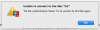
Same problem here (same message). I moved PDesktop 13 Business to a new Mac (from my old Mac) and I cannot register the license.
Yesterday, in the evening, I got a lot of problems trying to access/login to my Parallels account via web (many errors from Cloudfare).
Right now I'm unable to activate my license.
Yesterday, in the evening, I got a lot of problems trying to access/login to my Parallels account via web (many errors from Cloudfare).
Right now I'm unable to activate my license.
Today I tried once again the registration and it worked for me too.Same problem here (same message). I moved PDesktop 13 Business to a new Mac (from my old Mac) and I cannot register the license.
Yesterday, in the evening, I got a lot of problems trying to access/login to my Parallels account via web (many errors from Cloudfare).
Right now I'm unable to activate my license.
I'm going to think there were some kind of problem on the Parallels side.
We are glad to hear that the issue is resolved. Let us know if you need further assistance.It just worked for me.
Yes, the issue with Parallels Account portal is resolved. Feel free to reach out to us anytime for support.Today I tried once again the registration and it worked for me too.
I'm going to think there were some kind of problem on the Parallels side.