
Install the app
How to install the app on iOS
Follow along with the video below to see how to install our site as a web app on your home screen.
Note: This feature may not be available in some browsers.
You are using an out of date browser. It may not display this or other websites correctly.
You should upgrade or use an alternative browser.
You should upgrade or use an alternative browser.
parallels desktop pro 14 high cpu problem
- Thread starter ytuncez
- Start date

Hi @ytuncez, antivirus scanner might be working on the Mac side, locking the .pvm file and the associated processes. Can you please check out this article to fix the issue?I've upgraded from parallels desktop pro 13 to 14, but Windows 10 VM's consume high cpu.
I have done that on Windows 10 VM;
1- sfc /scannow
2- chkdsk /r
3- reinstall parallel tools
Kindly follow the instructions from this link and check if it helps.Antivirus is not installed on mac.
S
Sathiya@Parallels
Please follow the steps from this article to perform a clean boot by disabling the third party startup items and check if it helps.Unfortunately the instructions from that link is not resolved. This problem started after upgrading mac version to mojave.
I also have this problem - I cannot even tell what is eating up the processor. I am on 14 and then the problem started after mojave (I upgraded to 14 before updated MacOS). I have tried all the above, it runs like poo. For example, I try to rename a folder or file, it does not finish for up to 10 seconds.
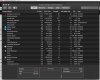
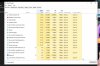
it is normal for it to go >200% on the MacBook Pro? I have a 2016 Core i7 with 16GB of Ram ... so this is not some old MacBook...
also I am on Win 10 Pro 1809 (Build 17763.55).
There seems to be some issues with Task Manager and CPU reading but that was "supposed" to be fixed on the Oct patch.

also I am on Win 10 Pro 1809 (Build 17763.55).
There seems to be some issues with Task Manager and CPU reading but that was "supposed" to be fixed on the Oct patch.
Last edited:
Ok, more and more I started thinking it's Windows 10 1809 - hard to tell since I changed Parallels, Windows, and MacOS nearly at the same time. I think most us of now know that M$ pull the Windows 1809 (lucky me I have it).
Sooo, I decided to go to Insiders. When I did that Windows ended up needing to restart (no surprise). After rebooting, it came up and logged in back to its old self - very fast. After on the desktop, its super (normal) responsive - everything popped as I click (start button, renaming files/folders, opening programs, etc.)
Then I checked Windows Updates, I did not think it had installed anything when I went to insiders - it just wanted to reboot after I *joined*. However, after checking for normal updates Windows started to download / apply the 2018-10 patch! Even after the reboot after installing 2018-10 patch it seem still ok. FYI - I had already installed 2018-10 back on the 9th/10th of October.
I am on slow ring and nothing has shown up. I'll see if my Win10 VM holds at this speed/performance and if not then I'll see what Fast Ring gives me. But right now I am happy. Not that I understand why this help but I am not looking into a gift horse's mouth!

Sooo, I decided to go to Insiders. When I did that Windows ended up needing to restart (no surprise). After rebooting, it came up and logged in back to its old self - very fast. After on the desktop, its super (normal) responsive - everything popped as I click (start button, renaming files/folders, opening programs, etc.)
Then I checked Windows Updates, I did not think it had installed anything when I went to insiders - it just wanted to reboot after I *joined*. However, after checking for normal updates Windows started to download / apply the 2018-10 patch! Even after the reboot after installing 2018-10 patch it seem still ok. FYI - I had already installed 2018-10 back on the 9th/10th of October.
I am on slow ring and nothing has shown up. I'll see if my Win10 VM holds at this speed/performance and if not then I'll see what Fast Ring gives me. But right now I am happy. Not that I understand why this help but I am not looking into a gift horse's mouth!

Hi @ytuncez, please back up your virtual machine or create a snapshot before following the troubleshooting steps mentioned below:Windows 10 version is 1803. It has still high cpu problem, I hasn't solved problem. Unfortunately, I started thinking that I return VMware fusion.
please shut down your Windows virtual machine and open VM config (configure -> Hardware -> Boot Order -> Advanced Settings -> Boot flags):
devices.hdd.fsync=3
After setting the boot flag, please check to work with the VM for a while and to reply us back with your feedback: whether it helped or not, how it works
I am having the same issue running parallels 14 with windows seven. My machine had been working just fine under parallels 12 and I started to see very high CPU usage every 10 seconds or so lasting for about 10 seconds. I couldn't for the life of me figure out which process was eating up so much CPU time--Even only running one single program (chrome, Internet explorer, PowerPoint...) Would result in massive intermittent CPU usage, where is concomitant freezing of the system for 10 to 15 seconds at a time. It's almost unusable. I tried uninstalling Norton, I tried uninstalling chrome, I tried running virus scans, nothing can stop this massive CPU intermittent usage, even tho I'm not really running any computationally intense programs.
I am also having huge CPU spikes that causes the VM to be completely unresponsive for seconds at a time. Windows 10 Pro 1809. Parallels Desktop 14. macOS 10.14.4 MacBook Pro 13" 2018
I tried a fresh install of the Windows VM to no luck. Will try the fsync boot flag above.
Edit: Switching the hypervisor to Apple as outlined in the other thread has helped.
I tried a fresh install of the Windows VM to no luck. Will try the fsync boot flag above.
Edit: Switching the hypervisor to Apple as outlined in the other thread has helped.
Last edited:
I'm running a 2014 mbp 15". I use to get 150% CPU usage but I did the following and now I idle at 20-25%:
- Processors set to 2, mem set to 3000mb
- graphics: memory set to auto
- Now under options > sharing > share windows > disable access windows folder from mac
I've been on Parallels 14 since it came out, and though it would get a little sluggish occasionally, it wasn't enough to bother me. But for the past few weeks it's been terrible - my entire Mac bogs down and everything is slow to respond. If I close down the VM, then the Mac runs fine. This was with both a Win 10 and Win 7 VM. After trying all the suggestions here and elsewhere didn't help any, I reinstalled Parallels 13 and now it runs great!
I hope they get this figured out for v15. Otherwise, I'm not upgrading again. Note that I'm on High Sierra (10.13.6), and don't have any plans to go to Mojave. But I'll see how 10.15 looks.
I hope they get this figured out for v15. Otherwise, I'm not upgrading again. Note that I'm on High Sierra (10.13.6), and don't have any plans to go to Mojave. But I'll see how 10.15 looks.
Just a suggestion, but open PD 14, do not start the VM, go to configure in the PD drop down menu and open "CPU and memory" Make sure you haven't allocated all the processors to the VM - I would suggest setting the "recommended" number see pic attached.
By way of explanation, I have been having appalling problems lately with freezes and slow operation of the VM and the Mac OS and the fans roaring. I have a four-core MacBook Pro. For some reason, the processor allocation in the CPU and Memory box was showing 4 processors allocated to the VM, ie all the processors. I understand that this can cause problems. Since switching to 2 (recommended) the problems have stopped.
However, I don't know whether this is a fix for the problem or not.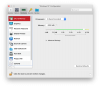
By way of explanation, I have been having appalling problems lately with freezes and slow operation of the VM and the Mac OS and the fans roaring. I have a four-core MacBook Pro. For some reason, the processor allocation in the CPU and Memory box was showing 4 processors allocated to the VM, ie all the processors. I understand that this can cause problems. Since switching to 2 (recommended) the problems have stopped.
However, I don't know whether this is a fix for the problem or not.
ChristopherT8
Bit poster
I am experiencing similar problems, my windows 10 was working well. I did not start it in a few months. having upgraded to the latest Mojave 10.14.6, windows is unresponsive. The system boots, then I log in, it takes several minutes, the SPU is at 196 in Activity monitoring. I have tried many of the steps above. It took me 2 days to get parallels tools to reinstall. I can't get to open settings to run windows update. I can't start task manager. trying to use CMD takes a hour to get a window to open, and all commands time out...
Any suggestions?
Any suggestions?
Hi, I can only repeat my last suggestion about checking the number of processor cores and setting it to the recommended level, which will usually be half the number of cores . . this has no been working like clockwork for 5 days! Apologies if you have already tried this.I am experiencing similar problems, my windows 10 was working well. I did not start it in a few months. having upgraded to the latest Mojave 10.14.6, windows is unresponsive. The system boots, then I log in, it takes several minutes, the SPU is at 196 in Activity monitoring. I have tried many of the steps above. It took me 2 days to get parallels tools to reinstall. I can't get to open settings to run windows update. I can't start task manager. trying to use CMD takes a hour to get a window to open, and all commands time out...
Any suggestions?