[in progress] OpenGL 4 Support (list of app titles and their status inside)

OpenGL 3 is also required for BIM ACCA Edificius. I have been using Parallels for years but this is a huge gap for professional use. For me it is becoming essential and I do not underestimate the migration to the competition. Such a pity.
 

Attachments

  • Screenshot 2019-03-10 09.19.13.png
    Screenshot 2019-03-10 09.19.13.png
    482.3 KB · Views: 7
Hi, I need Open GL 3.3 for my Skylum software Luminar 2018 and Aurora HDR 2018.
Can't use these now and they are one of the most important programs I use! Please add compatibility a.s.a.p.
Thanks
 
I have some problems with two softwares in Parallels 14.
The first one is Metrolog X4 from Metrologic Group. I get the "bestDot" error log in Windows when it crashes.
The second software is VXElements from Creaform. I get the "FramebufferObject" error log in Windows when i try to start it.
I guess the two commands used by these softwares are not supported in Parallels 14. Our company uses Parallels for these
two softwares and it's critical that they work. They used to work in previous versions, but not any more.
Thanks in advance.
 

Attachments

  • Skärmavbild 2019-03-17 kl. 20.21.36.jpg
    Skärmavbild 2019-03-17 kl. 20.21.36.jpg
    103.9 KB · Views: 5
  • Skärmavbild 2019-03-17 kl. 20.23.58.jpg
    Skärmavbild 2019-03-17 kl. 20.23.58.jpg
    168.9 KB · Views: 5
Hello, I am trying to run CTVox using Parallels 14 on a virtual Windows 10 machine on my mac running Mojave 10.14. While CTVox opens in the virtual machine, when I load a dataset into CTVox, I get an error that reads:

An error occurred during compilation of the GlSL shaders, forcing the application to exit.
Debug info:
Shader: em_abs|fragment
Log:
ERROR: 0:1:": #version required and missing.

I believe this is an OpenGL problem but I might be mistaken. Has anyone come across this error or could give me a suggestion on how to work around it? Many, many thanks.
 
Hello,

I'm trying to see if my Macbook Pro Mid-2010 will be able to run Sketchup 2018 using PD 14 on Windows 10 Home Edition.
I downloaded the OpenGL Viewer app (http://realtech-vr.com/admin/glview) and here's my graphics system:

upload_2019-3-29_2-25-4.png

GRAPHICS CARDS

Built-in:
Chipset Model: Intel HD Graphics
Type: GPU
Bus: Built-In
VRAM (Dynamic, Max): 288 MB
Vendor: Intel (0x8086)
Device ID: 0x0046
Revision ID: 0x0018
Automatic Graphics Switching: Supported
gMux Version: 1.9.22

Dedicated:
Chipset Model: NVIDIA GeForce GT 330M
Type: GPU
Bus: PCIe
PCIe Lane Width: x16
VRAM (Total): 512 MB
Vendor: NVIDIA (0x10de)
Device ID: 0x0a29
Revision ID: 0x00a2
ROM Revision: 3560
Automatic Graphics Switching: Supported
gMux Version: 1.9.22

Will Sketchup 2018 run on my system?
 
Hi, I need OpenGL 3.1 for Daslight 4, 3D visualization tool.


Thanks!
 
Last edited by a moderator:
I can not believe it, but OpenGL 3.3 still works in Parallels Desktop 15. There is not even the possibility to turn in on in the display settings for a virtual Windows, it's only for Linux. Hard to believe.
 
Now I'm using Parallels 15 and MegaCAD 2019 still does not work. MegCAD 2019 needs OpenGL 4.x. For two years I'm waiting for the current OpenGL version. Parallels still uses OpenGL version 2.1. Please change the version as soon as possible.
Thank you very much.

Dirk Hennlich
 
Has anyone worked with Parallels 15 and Rhinoceros 6 (McNeel) yet?
I am wondering if it is working. What Open GL version does Parallels 15 use?
Thanks for any feedback!
 
Hi MiguelR3,

We tried to run Cype 2019 in Parallels Desktop 15. No issues so far.
Can you please send us technical details via Parallels Desktop menu Help> Send Technical Data... Post Report ID here or send me a personal message with it and we will take a closer look.
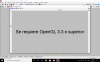
 
Hi MiguelR3,

We tried to run Cype 2019 in Parallels Desktop 15. No issues so far.
Can you please send us technical details via Parallels Desktop menu Help> Send Technical Data... Post Report ID here or send me a personal message with it and we will take a closer look.


The error gives in putting the 3d view of the building.
Captura de Pantalla 2019-10-30 a la(s) 15.58.54.png
 
MiguelR3,
Are you using Parallels Desktop version 15?
If so can you please post the report ID here. You can get it by using Help > Send Technical Data... menu.
 
Hi! I need OpenGL 3.3 to run the program Cypetherm Loads and as I understood, this topic is to ask for a Parallell's solution for this kind of issue, right?
 
Hi RafaelC1,

This is the right topic to ask. Can you please send me Report ID after you experience a error message in your scenario. You can get Report ID by using Parallels Desktop menu Help> Send Technical Data...
 
Back
Top