Hello,
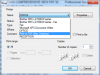
The "Print to PDF (mac desktop)" option no longer works for me. I get the following error when I try to open the .pdf.
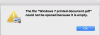
The file "Windows 7 printed document.pdf" could not be opened because it is empty.
It has always worked perfect but just stopped today. I am running Parallels 12 v 12.2.1 with windows 7 on an iMac with High Sierra v 10.13.1
Any thoughts?? This is really shutting me down right now. Thanks in advance.
The "Print to PDF (mac desktop)" option no longer works for me. I get the following error when I try to open the .pdf.
The file "Windows 7 printed document.pdf" could not be opened because it is empty.
It has always worked perfect but just stopped today. I am running Parallels 12 v 12.2.1 with windows 7 on an iMac with High Sierra v 10.13.1
Any thoughts?? This is really shutting me down right now. Thanks in advance.