Hi Maria, appreciate if you could advise if the Parallels team was able to replicate the issue at the very least? Thanks.Guys, please let us know if the issue still actual and provide us with your Parallels Desktop and macOS versions

Install the app
How to install the app on iOS
Follow along with the video below to see how to install our site as a web app on your home screen.
Note: This feature may not be available in some browsers.
You are using an out of date browser. It may not display this or other websites correctly.
You should upgrade or use an alternative browser.
You should upgrade or use an alternative browser.
Cannot save Excel for Mac 2016 files to VM
- Thread starter ShaneO2
- Start date
-
- Tags
- access to vm folders

Maria@Parallels
Problem solver
To be honest, I've tried to reproduced this issue on my test environments and wasn't able to do it.Hi Maria, appreciate if you could advise if the Parallels team was able to replicate the issue at the very least? Thanks.
Did you try these steps?
Just tried the steps you've asked, same issue after the re-install of Parallel Tools.To be honest, I've tried to reproduced this issue on my test environments and wasn't able to do it.
Did you try these steps?
Maria@Parallels
Problem solver
Hello, could you provide us with a bit more information of the issue please? Did you try to save Windows file on the Mac side?I cannot get exel 16 on my mac side to save as is with tools installed
Is it specifically an Excel issue or in PD? I am able to create a Word document and save it in the VM folders. The tech who did a remote session even disabled Avast to see if it was creating the issue, but it persisted. If I try to create a file and save it as a standard Excel format, .xls, .xlxs, .xlsm etc, it gives me that message. if I try to save as a Comm
https://homeheavenz.com/best-air-purifier-for-mold/
https://homeheavenz.com/best-air-purifier-for-car/
https://homeheavenz.com/best-air-purifier-for-asthma/
https://homeheavenz.com/best-air-purifier-for-dust/
https://homeheavenz.com/best-air-purifier-for-weed-smoke/
https://homeheavenz.com/best-filterless-air-purifier/
https://homeheavenz.com/best-air-purifier-for-mold/
https://homeheavenz.com/best-air-purifier-for-car/
https://homeheavenz.com/best-air-purifier-for-asthma/
https://homeheavenz.com/best-air-purifier-for-dust/
https://homeheavenz.com/best-air-purifier-for-weed-smoke/
https://homeheavenz.com/best-filterless-air-purifier/
Maria@Parallels
Problem solver
Hi, if the issue still there could you check the same behavior with the latest Parallels Desktop build 16.1.3 and share any results with us please?Having the same issue. Parallels needs to come up with a solution pls!!!
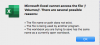
I tested this again with the new PD 16.1.3 and it resulted in the same problem. I get the attached error message "cannot access the file '/Volumes/'
The share settings are set to allow sharing between both windows and mac in the PD preferences, including executables.
While the file does not save, it does create a new empty folder in the windows save location that is of the same name as the attempted "save as" file name with an addition extension of ".sb-and a random string of alphanumeric characters"
This was not a problem for me in version 14 of Parallels Desktop. It's been a bug since I renewed w
Mac OS 10.13.6
PD 16.1.3
Excel 365 version 16.43
The share settings are set to allow sharing between both windows and mac in the PD preferences, including executables.
While the file does not save, it does create a new empty folder in the windows save location that is of the same name as the attempted "save as" file name with an addition extension of ".sb-and a random string of alphanumeric characters"
This was not a problem for me in version 14 of Parallels Desktop. It's been a bug since I renewed w
Mac OS 10.13.6
PD 16.1.3
Excel 365 version 16.43
Attachments
GrzegorzC1
Bit poster
Hi,
That Anybody solved this problem? I have the same issue with excel and paralle.
I use PD 15
Windows 10
Mac OS 11.4 but I have this problem with elier versions too.
Thanks for help.
That Anybody solved this problem? I have the same issue with excel and paralle.
I use PD 15
Windows 10
Mac OS 11.4 but I have this problem with elier versions too.
Thanks for help.
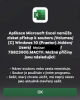
Problem persists with latest PD 17.1.1, Excel 16.57, macOS 11.6.3
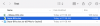
No problem on initial save, the issue is on subsequent saves. In my screenshot below, you can see the original file, the ~temp working version, and lastly a folder that gets created when Excel tries and fails to save over the existing. As others have said, Word doesn't have this problem.
No problem on initial save, the issue is on subsequent saves. In my screenshot below, you can see the original file, the ~temp working version, and lastly a folder that gets created when Excel tries and fails to save over the existing. As others have said, Word doesn't have this problem.
Attachments
The share settings are set to allow sharing between both windows and mac in the PD preferences, including executables.
While the file does not save, it does create a new empty folder in the windows save location that is of the same name as the attempted "save as" file name with an addition extension of ".sb-and a random string of alphanumeric characters"
While the file does not save, it does create a new empty folder in the windows save location that is of the same name as the attempted "save as" file name with an addition extension of ".sb-and a random string of alphanumeric characters"
Exact same problem here. 6 month old MB Pro.
OS 11.6.4
PD Business Edition Version 17.1.1 (51537)
Latest versions of all Office products for Mac
Word and Powerpoint save fine to the Windows location.
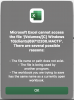
Excel gives the error - "Microsoft Excel cannot access the file '/Volumes/[C] Windows 10/clients/69712200.MACTF'. There are several possible reasons:
OS 11.6.4
PD Business Edition Version 17.1.1 (51537)
Latest versions of all Office products for Mac
Word and Powerpoint save fine to the Windows location.
Excel gives the error - "Microsoft Excel cannot access the file '/Volumes/[C] Windows 10/clients/69712200.MACTF'. There are several possible reasons:
I have the same issue, was there any solution to it ?
I am having the same issue, did not find any work around to it ? where you able to resolve it ?Exact same problem here. 6 month old MB Pro.
OS 11.6.4
PD Business Edition Version 17.1.1 (51537)
Latest versions of all Office products for Mac
Word and Powerpoint save fine to the Windows location.
Excel gives the error - "Microsoft Excel cannot access the file '/Volumes/[C] Windows 10/clients/69712200.MACTF'. There are several possible reasons:
View attachment 19331
MatthewB32
Bit poster
Running Parallels 18.0.0 (53049), macOS 12.5 (212G72), and Windows 11 Pro (21H2 22000.856). The same issue as others have shared over the past several years, and which inexplicably seems to not even be tracked as a known issue by Parallels (with basically every report here being punted back asking for version number when this has clearly persisted since version 14).
When attempting to save back a file stored on the Windows disk, Excel on Mac encounters an error:
"Microsoft Excel cannot access the file '/Volumes/[C] Windows 11.hidden/Users/username/AppData/Local/Temp/Folder/filemane.MACTF'. There are several possible reasons:
• The file name or path does not exist.
• The file is being used by another program.
• The workbook you are trying to save has the same name as a currently open workbook."
Mac apps, in general, clearly have read and write access to the folder in question -- for example, I was able to create and save a Word document in the same folder referenced above. If I try to save the file with a different name from Excel, it fails with the same error.
It appears the issue is the "MACTF" file that Excel is trying to read from, when trying to save the file. Going to look some more into this angle, since Parallels support seems disinclined to even log this issue properly, let alone help troubleshoot and solve it.
When attempting to save back a file stored on the Windows disk, Excel on Mac encounters an error:
"Microsoft Excel cannot access the file '/Volumes/[C] Windows 11.hidden/Users/username/AppData/Local/Temp/Folder/filemane.MACTF'. There are several possible reasons:
• The file name or path does not exist.
• The file is being used by another program.
• The workbook you are trying to save has the same name as a currently open workbook."
Mac apps, in general, clearly have read and write access to the folder in question -- for example, I was able to create and save a Word document in the same folder referenced above. If I try to save the file with a different name from Excel, it fails with the same error.
It appears the issue is the "MACTF" file that Excel is trying to read from, when trying to save the file. Going to look some more into this angle, since Parallels support seems disinclined to even log this issue properly, let alone help troubleshoot and solve it.