
Install the app
How to install the app on iOS
Follow along with the video below to see how to install our site as a web app on your home screen.
Note: This feature may not be available in some browsers.
You are using an out of date browser. It may not display this or other websites correctly.
You should upgrade or use an alternative browser.
You should upgrade or use an alternative browser.
macOS Big Sur/Parallels 16.1.1: don't connect usb external devices
- Thread starter ErricoM
- Start date
Same specs, same problem: usb memory not detected. If usb stick is defined as a permanent assignment, Windows 10 won't start at all. Parallels start up window just takes 100% cpu and nothing happens. Updated from 15.1.5 to 16.1.1. With 15 usb worked, but with 16 not anymore. Any solutions?
That's for USB disks but I can use any usb device, example USB network card, USB barcode scanner, etc. All of them are detected, none of the can be connected to the VM. With 15.1 and Catalina all was working fine./Library/Preferences/Parallels/dispatcher.desktop.xml
find
<Usb>0</Usb>
replace with
<Usb>1</Usb>.
It works for me.
same problem for me, only usb storage is mounted in VM other usb devices are detected but can't be mounted
i start thread here: https://forum.parallels.com/threads...be-also-mountable-in-paralles-desktop.351917/
also i start support ticket, i encourage you to open same support ticket maybe they don't read forum but should answer for ticket
i start thread here: https://forum.parallels.com/threads...be-also-mountable-in-paralles-desktop.351917/
also i start support ticket, i encourage you to open same support ticket maybe they don't read forum but should answer for ticket
Attachments
Hello Abel.
I'm struggling for this problem as well. I work in the automotive field and have a lot of usb devices which are not memory storage and must be used with Win: it has always worked since 2016 when I started using parallels, but with the last update none of this devices work anymore.
I'm virtualizing a Bootcamp partition, and if I start "natively" everything works: it a problem of Parallels drivers.
After your last post, I tried to remove everything and restart from scratch, but with no luck.
Can you please tell me what you did specifically? Thanks a lot
I'm struggling for this problem as well. I work in the automotive field and have a lot of usb devices which are not memory storage and must be used with Win: it has always worked since 2016 when I started using parallels, but with the last update none of this devices work anymore.
I'm virtualizing a Bootcamp partition, and if I start "natively" everything works: it a problem of Parallels drivers.
After your last post, I tried to remove everything and restart from scratch, but with no luck.
Can you please tell me what you did specifically? Thanks a lot
The steps are what I wrote, I removed my Parallels installation, removed manually /Library/Preferences/Parallels, reinstall latest version (16.1.2), before activation I'll try the VM in trial mode, update VM Tools and after that my devices, that previously were detected but unable to connect to the VM, worked.Hello Abel.
I'm struggling for this problem as well. I work in the automotive field and have a lot of usb devices which are not memory storage and must be used with Win: it has always worked since 2016 when I started using parallels, but with the last update none of this devices work anymore.
I'm virtualizing a Bootcamp partition, and if I start "natively" everything works: it a problem of Parallels drivers.
After your last post, I tried to remove everything and restart from scratch, but with no luck.
Can you please tell me what you did specifically? Thanks a lot
I've tested a barcode scanner with RS232 emulation, USB Lan interface and works ok. VCDS is a simple USB device, I use Xentry PassThru with an Actia XS USB and also works.
Don't know really why it works now, but those are the steps I did. Anyway I'm moving to VMWare, I don't need the 3D stuff (that is the only difference I've found in performance between both platforms) because last times these kind of problems are very common in PD and I'm tired of waste my time trying to solve it.
Sorry but two days ago I moved my three Macs to VMWare and uninstalled Parallels so I can't help you, good luck anyway...Thank you Abel. I tried but to no luck.
Can I ask you, since now it works for you, if you can publish the contents of your /Library/Preferences/Parallels/dispatcher.desktop.xml file, so to see if there is any meaningful configuration?
Thanks a lot
no prob, thanks.. in any case, me as well have setup Bootcamp via VMWare this afternoon and everything works fine. It seems to me slower and with some graphical glitch (like the mouse pointer with weird borders sometime), but I still have to work on the options, so let's see.Sorry but two days ago I moved my three Macs to VMWare and uninstalled Parallels so I can't help you, good luck anyway...
Hope Parallels will fix the problems meanwhile, but I have to work with the system and cannot wait for their time, since they do not seem to consider particularly of interest these problems.
Not a great customer support and retention, jm2c
Before I write this, please know I faced a similar problem and spent some time on the phone with support. They were helpful and troubleshot for about 15 minutes doing everything I already did. Then the support individual had me send technical information and change a permission in the Mac settings. Now the USB drive works as expected.
Without going through the step by step, here is the very short resolution for my case:
Shutdown VM
Shutdown Parallels Desktop
(Mac) System Preferences -> Security & Privacy -> Privacy -> Full Disk Access -> + (Manually Add Parallels Desktop)
Start Parallels Desktop
Start VM
I hope this helps.
Without going through the step by step, here is the very short resolution for my case:
Shutdown VM
Shutdown Parallels Desktop
(Mac) System Preferences -> Security & Privacy -> Privacy -> Full Disk Access -> + (Manually Add Parallels Desktop)
Start Parallels Desktop
Start VM
I hope this helps.
Don't know what means "Bootcamp via VMWare" since Bootcamp doesn't need any kind of virtualization so I guess you mean you've installed Fusion and setup a VM.no prob, thanks.. in any case, me as well have setup Bootcamp via VMWare this afternoon and everything works fine. It seems to me slower and with some graphical glitch (like the mouse pointer with weird borders sometime), but I still have to work on the options, so let's see.
Hope Parallels will fix the problems meanwhile, but I have to work with the system and cannot wait for their time, since they do not seem to consider particularly of interest these problems.
Not a great customer support and retention, jm2c
The performance is the almost the same (better CPU in VMWare, worst GPU in VMWare) except in 3d graphics, for example with PD you can use Autodesk Inventor, with VMWare it's veeeery slow due the intense GPU use in 3D. I use PD mainly developing Win software (Visual Studio) and for automotive stuff as a fun and the speed is the same for that use.
One of the first things I did was enable all the stuff about Parallels in Security & Privacy and that did not solve anything. I guess that you've been lucky and they touch anything more in the support session, I gyess really don't know what's happen, I got one of my installation work and still don't know exactly that was the right thing. Since version 14 this product is a big beta that force users that need more than just a VM to work with Office to investigate and find workarounds just to works. Don't know if this is for MacOS and its new security or what, but every version goes worst.Before I write this, please know I faced a similar problem and spent some time on the phone with support. They were helpful and troubleshot for about 15 minutes doing everything I already did. Then the support individual had me send technical information and change a permission in the Mac settings. Now the USB drive works as expected.
Without going through the step by step, here is the very short resolution for my case:
Shutdown VM
Shutdown Parallels Desktop
(Mac) System Preferences -> Security & Privacy -> Privacy -> Full Disk Access -> + (Manually Add Parallels Desktop)
Start Parallels Desktop
Start VM
I hope this helps.
I mean that I basically use PD to virtualize my bootcamp partition, so I can use it without restarting the Mac, and at the same time I don't create a brand new VM. So I create a VM to use the Bootcamp partitionDon't know what means "Bootcamp via VMWare" since Bootcamp doesn't need any kind of virtualization so I guess you mean you've installed Fusion and setup a VM.
The performance is the almost the same (better CPU in VMWare, worst GPU in VMWare) except in 3d graphics, for example with PD you can use Autodesk Inventor, with VMWare it's veeeery slow due the intense GPU use in 3D. I use PD mainly developing Win software (Visual Studio) and for automotive stuff as a fun and the speed is the same for that use.
Thanks, I will test more in deep the new VM framework and see if everything is the sameI mean that I basically use PD to virtualize my bootcamp partition, so I can use it without restarting the Mac, and at the same time I don't create a brand new VM. So I create a VM to use the Bootcamp partition

Thank you Adam.Before I write this, please know I faced a similar problem and spent some time on the phone with support. They were helpful and troubleshot for about 15 minutes doing everything I already did. Then the support individual had me send technical information and change a permission in the Mac settings. Now the USB drive works as expected.
Without going through the step by step, here is the very short resolution for my case:
Shutdown VM
Shutdown Parallels Desktop
(Mac) System Preferences -> Security & Privacy -> Privacy -> Full Disk Access -> + (Manually Add Parallels Desktop)
Start Parallels Desktop
Start VM
I hope this helps.
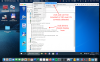
I just tried your suggestion, manually adding PD in the Privacy tab as illustrated, but with no luck: nothing changes, even with a restart or Parallels Tools reinstalled

Don't know what else to try, hope the customer support to intervene