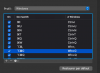
Bad keyboard mapping with French keyboard

M-Rick

Bit poster
There is an issue that have never resolved in Parallels Desktop

The letter A is not mapped correctly.

If I type A, it writes A.

If I do Apple A for Select all, the current application will quit.

There is no way to force the shotcut in the preferences. It is not working.

There is no problem with other OS X shotcuts, only this one.

I didn't call back Parallels support again for this bug because the last time the phone support took me more than 2H for nothing more and I have things to be done…

To reproduce:

In Mac OS, set keyboard to FR (AZERTY)

Set keyboard mapping to French (Apple) - Parallels in Windows (AZERTY) or standard US QWERTY in the VM (The VM mapping doesn't matter).

Launch an application, whatever the one you want, doesn't matter. For example the word pad.

Write something.

Press Apple + A to select all.

It will quit the application.

But worst, if you press Apple + A when no application is running, it will quit Windows!

If in Mac OS, the keyboard is set to US (QWERTY), Select All (Apple+A) doesn't work but it will not quit the application. Other shortcuts do work but they write the shortcut letter, for example, i do Apple + X to cut, it does work, it will cut but write a X in a text for example.
 
Last edited:
I have the same problem. French mapping works in the VM when I'm typing text. But all the keyboard shortcuts are based on US mapping. For example I have to map CMD-Q -> CTRL->Q to be able to select all (CMD-A)
But when I type 'a' I get a 'a'. Same for 'q'. So the problem lies in the global keyboard profile.

Any news on this bug ?
Thanks
 
hi

it has never been fixed after having filled 2 requests and spent more than 2 hours at phone with the support…
Like they couldn't do the tests themselves after having the information and how to reproduce…

Parallels support is not really efficient anyway.
 
Thanks for the update M-Rick. Their answer to you asking you to transfer the message to the maintenance team was indeed already pretty lame.
 
I have been contacted for the private beta testing for Parallels 9. This problem is still there and several Parallels updates later …
there are still 2 opened tickets, they have been been closed without having ever been treated !
[Parallels #1370775] Bad keyboard mapping with French keyboard
[Parallels #1280844] Mac OS X shorcuts menu not working

they just don't care about French users!
 
Last edited:
Same issue with Parallel 9, any clue ?

Could we list the Windows versions this bug happens with?

Mine is XP/XP Pro FR

Didn't try with Seven neither Eight.

The clue is to hassle the support team because they tend to neglect this long standing bug that didn't happen in earlier versions of Parallels Desktop. It began with version 6.
 
These are all my reports and 4 years of wait!
#1280844 #1370775 #1682777 #1823070 #1859537

I lost more than 2 hours in live one day with the support team to see there was effectively this bug.
You are called at anytime without even fixing an appointment before, and what for since I have completely documented it step by step 3 times?
I was invited as a beta tester for version 10, so I tested this of course and reported it, it was supposed to be fixed for the final... But nothing and still nothing in the several updates coming later...

I just switched to VMware Fusion 7. It works any better, it is just happiness.
bye bye Parallels and all those paying upgrades with no support behind.
I give up with those broken arms...
 
Last edited:
Almost ten years later now - and as a new Parallels Pro user I still have this same issue.
In my case a (Belgian) French Keyboard and CTRL+A quits any application (instead of "select all")
Every time I select all text in a Parallels Windows VM I get reminded of this very annoying bug...
 
Almost ten years later now - and as a new Parallels Pro user I still have this same issue.
In my case a (Belgian) French Keyboard and CTRL+A quits any application (instead of "select all")
Every time I select all text in a Parallels Windows VM I get reminded of this very annoying bug...

Actually the keyboard combination that does not work correctly is the Apple CMD+A mapping, CTRL+A is not mapped so works same as on windows.
 
I FIND A WAY GUYS.
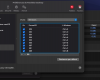
Change those like that in the "Windows" Profil :
CMD A to CTRL + A
CMD Z to CTRL + Z
CMD Q to CTRL + Q
CMD W to CTRL + W

Everything working well now :D, i am happy, i tried hard for several minutes
 
Hi Jojo, are you on Azerty keyboard ?
If so, please explain me how you did it (or screenshot), because obviously I had already tried what you suggested :)
 
Hi Jojo, are you on Azerty keyboard ?
If so, please explain me how you did it (or screenshot), because obviously I had already tried what you suggested :)
Hey Bart, i am so sorry for answering so late.

Had some trouble with the website and my email.

Yeah i have. a french keyboard, Azerty keyboard,
Here we go :

Capture d’écran 2022-11-16 à 00.12.16.png Capture d’écran 2022-11-16 à 00.13.00.png
Let me know if it works after that
 
Back
Top