I also just had the same problem. I had been trying to solve it with Apple Support before having someone ask me about recently installed software. That is when the light went on in my head and I found this tread. Here is what I was experiencing:
1. Parallels is not open. I think this is important to realize. This was happening to my Mac OS without parallels running.
2. Desktop items show up when I was using my MacBook Pro M1 without an extended screen. (just as a laptop)
3. When I plugged the external monitor in, all desktop items in the desktop folder disappeared. The external hard drives still showed on the desktop. The desktop items also disappear from the desktop folder. However, if you were to search for one of those items, you can find it and it will show that it is still in the desktop folder.
4. When the external monitor is unplugged, the desktop and desktop folder will again show all files and folders.
Because parallels was not open, I did not immediately think that they were connected.
Here was my fix:
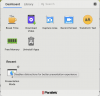
1. Open parallels toolbox.
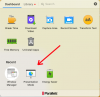
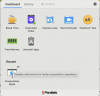
2. Under recent the presentation mode icon showed up.
3. Click the very small gear icon just to the upper right of the presentation mode icon. The gear does not show up until you hover your pointer over the presentation mode icon. (see image below)
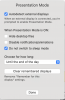
4. When the presentation mode setting come up, uncheck the "Hide Desktop Files" option under "When Presentation Mode is ON". (see image below).
Good luck, and I hope this saves someone the trouble I had. Parallels should NOT have this automatically selected since it affects not only "presentation mode" but also second monitors.
Todd.