Parallels Toolbox Switch Resolution lost retina options in MacOS 12.2

ZachT2

Bit poster
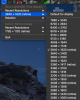
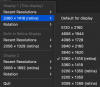
I just upgraded to MacOS 12.2 (12.1) and my ultrawide monitor has lost many resolution options, both 'Retina' and not, in Parallels Toolbox Switch Resolution. It's the same monitor, same cable, same computer. Attached are screen shots of Parallels Toolbox Switch Resolution from MacOS 12.2 and 10.15.7 (Catalina) since that's the only way for me to go 'back' by using an older computer with the same monitor/cable.
How do I get these options back? Notably 3840x1620 as RETINA
 

Attachments

  • SR_options_MacOS10_15_7.png
    SR_options_MacOS10_15_7.png
    199.5 KB · Views: 9
  • SR_options_MacOS12_2.png
    SR_options_MacOS12_2.png
    112 KB · Views: 9
I just upgraded to MacOS 12.2 (12.1) and my ultrawide monitor has lost many resolution options, both 'Retina' and not, in Parallels Toolbox Switch Resolution. It's the same monitor, same cable, same computer. Attached are screen shots of Parallels Toolbox Switch Resolution from MacOS 12.2 and 10.15.7 (Catalina) since that's the only way for me to go 'back' by using an older computer with the same monitor/cable.
How do I get these options back? Notably 3840x1620 as RETINA
Hello @ZachT2, Please try reinstalling Parallels Tools by referring to this KB article: https://kb.parallels.com/115835 and check. Thanks, Parallels Team.
 
Thanks for reply. This issue isn't in a VM, it's in Parallels Toolbox on my primary mac that has Parallels installed. I've just tried quitting Parallels Toolbox, installing and restarting Toolbox and still have same issue.
 
Back
Top