Using Parallels on my M1 Mac, guest OSX VM's = no internet access

RodgerB1

Junior Member
1. Uninstalled and then reinstalled parallels for my and my MacBook Pro.
2. Installed a fresh OSX Monterey.
3. Did not change Network config, so should be on SHARED networking. (in a hotel, and can not do bridged for these VM's)
4. Guest OS gets vended a proper private Ip from what I assume is the DHCP scope (not place to edit this, see this, change this, or modify this. this is NOT the same scope as specified in Parallels prefs)
5. I suspect some NIC instance inside of my root Mac OSX got deleted that was needed (was trying to troubleshoot today, and likely removed it from the root Mac OSX config, hence why i uninstalled/reinstalled to try to get whatever was needed reinstalled by parallels).
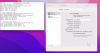
6. See attached pic for some info on the guest OS that might help. ANY IDEAS?
 

Attachments

  • Screen Shot 2022-03-21 at 2.55.23 PM.png
    Screen Shot 2022-03-21 at 2.55.23 PM.png
    605.1 KB · Views: 67
That does not apply @Asish@Parallels. I am on M1, there is no VM configuration option with M1 MacOS guest VM's. There is basically nothing, other than START, REMOVE, and SHOW IN FINDER.
Hello, please try to create another Mac OS Monterey VM and check if the configuration option is there. Please check if you are running the latest build of Parallels Desktop.
 
I am curious, have you ran parallels on an M1 Mac?

Everyone on my entire team, and from what I can tell based on the Googles, and your own KB articles, everyone else that runs Parallels on an Apple Silicone based Mac has very very limited functionality. Basically, you can change your networking by creating a config.ini file, and you can set it to shared, but you have ZERO control over that shared network ip range, or direct, you can right click delete, right click show in finder, and right lick start/stop. That's it. No drag and drop, no copy paste, no snapshots, no configure, etc.

Is there is a posted roadmap/timeline for when this basic functionality might become available?

Also, for the record, it's still 100% broken for me. If I configure the config.ini to be hardware type 1 (shared) I get an error when even trying to ping the alloted gateway Ip of 192.168.54.1
[Hardware]
Network.Type = 1

It's fairly clear that there is a configuration for this shared network that is corrupted or that needs to be configured, but there is zero documentation as to where this is handled, or how to manipulate or modify it. If for instance my internal IP address range in my house was also 192.168.64.0/24 how would I change this DHCP range to something else?
 
I am curious, have you ran parallels on an M1 Mac?

Everyone on my entire team, and from what I can tell based on the Googles, and your own KB articles, everyone else that runs Parallels on an Apple Silicone based Mac has very very limited functionality. Basically, you can change your networking by creating a config.ini file, and you can set it to shared, but you have ZERO control over that shared network ip range, or direct, you can right click delete, right click show in finder, and right lick start/stop. That's it. No drag and drop, no copy paste, no snapshots, no configure, etc.

Is there is a posted roadmap/timeline for when this basic functionality might become available?

Also, for the record, it's still 100% broken for me. If I configure the config.ini to be hardware type 1 (shared) I get an error when even trying to ping the alloted gateway Ip of 192.168.54.1
[Hardware]
Network.Type = 1

It's fairly clear that there is a configuration for this shared network that is corrupted or that needs to be configured, but there is zero documentation as to where this is handled, or how to manipulate or modify it. If for instance my internal IP address range in my house was also 192.168.64.0/24 how would I change this DHCP range to something else?
Hello, Please check this KB article: https://kb.parallels.com/4948 under DHCP.
You can refer to this link: https://download.parallels.com/desktop/v12/docs/en_US/Parallels Desktop User's Guide/33341.htm to make the necessary changes to the settings of the Parallels DHCP servers for IPv4 and IPv6.
Note: Shared network settings are available in Parallels Desktop for Mac Pro Edition only.
 
Hello, please try to create another Mac OS Monterey VM and check if the configuration option is there. Please check if you are running the latest build of Parallels Desktop.
This is not how your product works. On M1 macs, there is no configuration option, no matter how many times you recreate it. You should not be replying to and supporting things you do not understand.
 
This is not how your product works. On M1 macs, there is no configuration option, no matter how many times you recreate it. You should not be replying to and supporting things you do not understand.

Thanks for posting this! I 100% agree, I just gave up trying.

Clearly I have more direct understanding of the product on M1's than support does, so the best I could do is set my networking to type II, and if I am going to a hotel, where I can't do Bridged, I need to bring another MbPro intel based machine with me and pay for an additional parallels license just so I can share my VMs on demos I need to give. The other option would be a wipe my M1 and setup from scratch, but even if I could make that work from a timemachine backup and restore, I do not have time for it.

If there was an option, I would have already jumped ship away from Parallels, but as of yet, this is the only M1 game in town.
 
^^^ This is super helpful, thanks, installing virtual buddy now. more useful than Partallels, $0! Thanks Parallels forum! hah
 
I agree with this line from the article, while parallels does a great job on managing Windows and Linux machines, their m1 based OSX vm control is BAD.


".....and Parallels should be embarrassed at releasing a product missing a proper control interface."
 
I was having this problem this morning. On the guest I went to System Preferences > Network > Ethernet > Advanced > DNS and replaced the DNS server listed with CloudFlare's 1.1.1.1 DNS server and I was then able to access the internet on the guest.
 
I was having this problem this morning. On the guest I went to System Preferences > Network > Ethernet > Advanced > DNS and replaced the DNS server listed with CloudFlare's 1.1.1.1 DNS server and I was then able to access the internet on the guest.

In my case it's not a DNS issue, its a routing issue. i.e. I can't ping 8.8.8.8, which bypasses any DNS searching completely. It's still broken for me, SHARED networking simply doesn't work, and unfortunately Parallels own support staff doesnt seem to have any knowledge of the intricacies of how their M1 based product functions as of right now.

As more and more people adopt Apple Silicon processors Parallels is going to be in a heap of trouble if they don't improve the functionality of their product.
 
I seem to have a similar issue.
Ping works fine, but Safari and other browsers (tested with Brave) kind of randomly can not open web pages.
The weird thing is, some pages open, but load super slow, while most do not load.
Safari gives me the error message "because the server unexpectedly dropped the connection".
 
Thats really odd.
Are you pinging an IP address or a dns entry, such as google.com?
What are your settings inside the VM? 192.168.64.X ip address?

I seem to have a similar issue.
Ping works fine, but Safari and other browsers (tested with Brave) kind of randomly can not open web pages.
The weird thing is, some pages open, but load super slow, while most do not load.
Safari gives me the error message "because the server unexpectedly dropped the connection".
 
Thats really odd.
Are you pinging an IP address or a dns entry, such as google.com?
What are your settings inside the VM? 192.168.64.X ip address?
Hello, I agree that the support is not what I had expect. Rodger, did you find the solution ? What about the solution given by PavelS6 ?
I don't see the same structure in the folder than him so it does not work for me. I have got a wonderful M1 max that I would not have bought without the possibility tu use windows... Many thanks for help, Pierre
 
Windows is fine, well relatively so. Windows has mostly full functionality, its limited in that its basically beta software (the Windows11 you will install when selecting Windows as a gust OS). The problem is with Mac OC VM's. Network type 2 works, but that doesnt fix my problem unfortunately. Thats Bridged mode networking, and sometimes you just need to do Shared Mode, and the only fix I can come up with is a full computer wipe and reinstall. I am SURE there is as fix, Parallels support simply doesn't go above tier12 unfortunately. :(
 
Back
Top