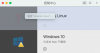
Hello, I am trying to delete a virtual machine from my Mac computer running Parallels Desktop, but I am having trouble finding the virtual machine's registration information. I have tried running the 'prlctl list -a' command, but the virtual machine still appears in the Parallels Control Center and I cannot delete it. I also tried to locate the parallels.xml file in the /Users/xxx/Library/Parallels/ directory, but it does not seem to exist. Can you please help me resolve this issue?
prlctl list -a
UUID STATUS IP_ADDR NAME
{efb213e7-0fa6-4723-b461-5883c1acc5a9} suspended - Ubuntu Linux
{a6ad2ded-7ba6-4140-a170-96009688b08c} suspended - Windows 10
sudo prlctl delete {efb213e7-0fa6-4723-b461-5883c1acc5a9}
Password:
Failed to get VM config: The virtual machine could not be found. The virtual machine is not registered in the virtual machine directory on your Mac.
sudo prlctl unregister {efb213e7-0fa6-4723-b461-5883c1acc5a9}
Failed to get VM config: The virtual machine could not be found. The virtual machine is not registered in the virtual machine directory on your Mac.
prlctl list -a
UUID STATUS IP_ADDR NAME
{efb213e7-0fa6-4723-b461-5883c1acc5a9} suspended - Ubuntu Linux
{a6ad2ded-7ba6-4140-a170-96009688b08c} suspended - Windows 10
sudo prlctl delete {efb213e7-0fa6-4723-b461-5883c1acc5a9}
Password:
Failed to get VM config: The virtual machine could not be found. The virtual machine is not registered in the virtual machine directory on your Mac.
sudo prlctl unregister {efb213e7-0fa6-4723-b461-5883c1acc5a9}
Failed to get VM config: The virtual machine could not be found. The virtual machine is not registered in the virtual machine directory on your Mac.