Thanks a lot. I did a new installation and could connect in the proper way. Now I am disappointed to see that NDI tools and NDI in general seems to have a problem. I will make a dedicated post in a different thread. Just wanted to thank you ones again for your reply.

Install the app
How to install the app on iOS
Follow along with the video below to see how to install our site as a web app on your home screen.
Note: This feature may not be available in some browsers.
You are using an out of date browser. It may not display this or other websites correctly.
You should upgrade or use an alternative browser.
You should upgrade or use an alternative browser.
Using Parallels on my M1 Mac, guest OSX VM's = no internet access
- Thread starter RodgerB1
- Start date
The best I could do is set my networking to type II, and if I'm going to a hotel where I can't do bridged, I need to bring another MbPro intel-based machine with me and pay for an additional parallels licence just so I can share my VMs on demos I need to give. It's obvious that I have a more in-depth understanding of the product on M1s than support does. The alternative would be to completely erase my M1 and start over, Top20 plus but even if I could do that using a time machine backup and restore, I do not have the time.
Regards for sharing this. I just given up trying, and I totally agree.
The best I could do is set my networking to type II, and if I'm going to a hotel where I can't do bridged, I need to bring another MbPro intel-based machine with me and pay for an additional parallels licence just so I can share my VMs on demos I need to give. It's obvious that I have a more in-depth understanding of the product on M1s than support does. The alternative would be to completely erase my M1 and start over, but even if I could do so using a time machine backup and restore, I do not have the time.
If I had the choice, I would have
The best I could do is set my networking to type II, and if I'm going to a hotel where I can't do bridged, I need to bring another MbPro intel-based machine with me and pay for an additional parallels licence just so I can share my VMs on demos I need to give. It's obvious that I have a more in-depth understanding of the product on M1s than support does. The alternative would be to completely erase my M1 and start over, but even if I could do so using a time machine backup and restore, I do not have the time.
If I had the choice, I would have
I appreciate you sharing this. I have given up trying; I completely agree.
The best I could do is set my networking to type II, and if I'm going to a hotel where I can't do Bridged, I need to bring another MbPro intel-based machine with me and pay for an additional parallels licence just so I can share my VMs on demos I need to give. Clearly, I have a more direct understanding of the product on M1s than support does, so that's why I have to bring more MbPro machines than they do.
The best I could do is set my networking to type II, and if I'm going to a hotel where I can't do Bridged, I need to bring another MbPro intel-based machine with me and pay for an additional parallels licence just so I can share my VMs on demos I need to give. Clearly, I have a more direct understanding of the product on M1s than support does, so that's why I have to bring more MbPro machines than they do.
WOW. Couldn't bother to create a setting button for MacOS even on the PRO version? Instead I have to edit a text file? Ridiculous!
You feel my pain! Still surprisingly zero movement on this. I mean, its only a matter of time before all mac's are running Apple Silicon, will parallels just close it's doors at that point in time?
i wish it was!
On an M1 there is no config you can edit. No right click menu, no snapshots. The only thing is to manually create a Cofig.ini and you can manually add a few small setting changes. but thats it.
On an M1 there is no config you can edit. No right click menu, no snapshots. The only thing is to manually create a Cofig.ini and you can manually add a few small setting changes. but thats it.
In case this is relevant to your situation despite you being on an M1 Mac and me being on an Intel Mac -- I had a Parallels tech troubleshoot my inability to get a live internet working on my MacOS 13 VM and the problem was fixed by
a) In Configuration for that VM, go to Hardware, select the Network icon and hit the minus sign down below to DELETE IT
b) Now hit the plus sign and add Network anew.
c) Try it with standard shared networking (default settings).
Apparently something can get corrupted in the hardware preferences that isn't affected by changing the network configuration, but gets reset if you delete Network entirely and then add it back in.
If only people paid for this knowledge, if you have a VPN them MacOS VM it will not connect to the internet, you either need to disable the host VPN or you need to set the config.ini below to shared and reinstall the vpn software in the VM, it's always nice to beta test live released products!
[Hardware]
Network.Type=2
[Hardware]
Network.Type=2

Aydaskhan Asochakov
Parallels Support
Greetings everyone,
We are sorry for the delayed response.
To let us determine the issue, kindly provide us with your scenario, reproduce the issue and collect technical report as per this article: https://kb.parallels.com/en/9058
Then copy 9-digit ID of the report and provide it in a reply message.
We are looking forward to hearing from you soon.
We are sorry for the delayed response.
To let us determine the issue, kindly provide us with your scenario, reproduce the issue and collect technical report as per this article: https://kb.parallels.com/en/9058
Then copy 9-digit ID of the report and provide it in a reply message.
We are looking forward to hearing from you soon.
I try to use NDI tools from Newteck in Windows version (because the mac version is not complete)
https://ndi.tv/tools/#download-tools
It is said :
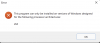
"This program can only be installed on version of Windows designed for following architecture : x64"
here is the report ID : 422459084
THANKS !!! i am very limited in my use of windows on parallels because i work a lot with NDI. I had to buy a PC to continue to explore. I really hope we will find the sollution. NDI is in high évolution and it would be a big limitation that Parallels remains unable to handle NDI tools.
https://ndi.tv/tools/#download-tools
It is said :
"This program can only be installed on version of Windows designed for following architecture : x64"
here is the report ID : 422459084
THANKS !!! i am very limited in my use of windows on parallels because i work a lot with NDI. I had to buy a PC to continue to explore. I really hope we will find the sollution. NDI is in high évolution and it would be a big limitation that Parallels remains unable to handle NDI tools.

Pavel Merkulov
Parallels Team
Hello,I try to use NDI tools from Newteck in Windows version (because the mac version is not complete)
https://ndi.tv/tools/#download-tools
It is said :
"This program can only be installed on version of Windows designed for following architecture : x64"
here is the report ID : 422459084
THANKS !!! i am very limited in my use of windows on parallels because i work a lot with NDI. I had to buy a PC to continue to explore. I really hope we will find the sollution. NDI is in high évolution and it would be a big limitation that Parallels remains unable to handle NDI tools.
Thank you for the provided data.
Judging by the error, the application does not support the Arm architecture.
The Apple M1 chip has an ARM architecture (unlike the x86/x64 architecture typical of classic desktop processors). And in a virtual machine on a Mac with an M1 chip, it is currently possible to run only Window 11 ARM--the Windows version for processors with ARM architecture (for example, it is used on devices with mobile chips like Microsoft Surface Pro X). And indeed, despite the built-in compatibility layer that allows you to run x86/x64 applications on Windows ARM, some applications, or drivers do not work.
We advise you to contact the NDI support team to inquire about when support for Windows 11 ARM will be implemented.
I figured out how to get this to work. Seems that the guest macOS VM sets to using a DHCP. If you change it to be on the bridge network created by parallels on the host it works. So here are the steps:
1) on host machine, determine the bridge10x network that the macOS is attached to. Run ifconfig from the terminal. Mine was bridge101 (my bridge100 corresponds to my windows VM, there is probably a prlctl command that will tell you what is what):
3) in the macOS VM, open settings->network->ethernet click details, click TCP/IP. Change configure IPv4 to Manual. Change IP address to 10.37.129.3 (add 1 to the number above). Set the router to 10.37.129.2.
Note: Do not update the config.ini with Network.Type=2 as suggested above for this solution. Your network should be set to shared for this to work correctly.
-gigs
1) on host machine, determine the bridge10x network that the macOS is attached to. Run ifconfig from the terminal. Mine was bridge101 (my bridge100 corresponds to my windows VM, there is probably a prlctl command that will tell you what is what):
bridge101: flags=8863<UP,BROADCAST,SMART,RUNNING,SIMPLEX,MULTICAST> mtu 1500
.....
inet 10.37.129.2 netmask 0xffffff00 broadcast 10.37.129.255
.....
2) copy 10.37.129.2 (your's may be different).....
inet 10.37.129.2 netmask 0xffffff00 broadcast 10.37.129.255
.....
3) in the macOS VM, open settings->network->ethernet click details, click TCP/IP. Change configure IPv4 to Manual. Change IP address to 10.37.129.3 (add 1 to the number above). Set the router to 10.37.129.2.
Note: Do not update the config.ini with Network.Type=2 as suggested above for this solution. Your network should be set to shared for this to work correctly.
-gigs
^^^^
this fixed my issue, which was rather strange. I've been using 6 Windows and 2 OS VMs for over a month with no issues. Then suddenly, after my host was reboot, the macOS VMs stopped connecting to the host network. Changing the IPV4 config to manual and the IP set to 1 above the bridged address worked...for now. But at least I can get back to work.
this fixed my issue, which was rather strange. I've been using 6 Windows and 2 OS VMs for over a month with no issues. Then suddenly, after my host was reboot, the macOS VMs stopped connecting to the host network. Changing the IPV4 config to manual and the IP set to 1 above the bridged address worked...for now. But at least I can get back to work.