
Install the app
How to install the app on iOS
Follow along with the video below to see how to install our site as a web app on your home screen.
Note: This feature may not be available in some browsers.
You are using an out of date browser. It may not display this or other websites correctly.
You should upgrade or use an alternative browser.
You should upgrade or use an alternative browser.
accessing localhost
- Thread starter Keithiopian
- Start date
Solution was the same everyone else. Just use VirtualBox instead. Amazing that a free product is more capable.Having the same problems. Trying to connect to '10.211.55.2:3000' but can't even connect to '10.211.55.2'. Running a Rails server on 'customdomain:3000' but can't get the VM to connect. Any help would be appreciated.
Thanks
I have an angular 6 CLI build:watch task running (--host doesn't work with build task) Mac
So I used the IPv4 Address under: System Preference -> Network -> Advanced -> TCP/IP
Follow that with your Port number (mine was 8080 I think the default is 4200)
I also had shared connection within parallels - setup as default, no customisation needed.
Hope this helps someone
So I used the IPv4 Address under: System Preference -> Network -> Advanced -> TCP/IP
Follow that with your Port number (mine was 8080 I think the default is 4200)
I also had shared connection within parallels - setup as default, no customisation needed.
Hope this helps someone
Attachments
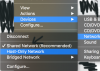
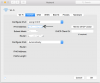
My Machine MacOS Catalina, Macbook Pro 2018,Hello All,
I have downloaded and installed Parallel's/Window's 7 for the sole purpose of testing on Internet Explorer. I have a site which I am building located at localhost. I am able to access this on my mac side with all browsers, however when I switch over to Windows and try to access localhost I am unable to access. Has anyone any insight for this?
Thanks for you help!
Parallels Desktop 15, Ubuntu
Issue faced with flask python server : Unable to connect / check your proxy (http://127.0.0.1/xxxx) host
Solution:
Shutdown the virtual machine Operating system, in my case the ubuntu
Parallels settings for that vm OS, you can see a gear icon when you move the mouse pointer to the top
Select Hardware and then Select Network
Change the source to Default adapter
Select Advanced Settings , Do not make any change to the MAC , just select the type and choose the network adapters one by one and restart your vm OS (ubuntu), one of the adapter will execute and run the flask local host server, in my case, Inter(R) Pro worked fine.
Thanks
ChristopherS24
Bit poster
Not sure how helpful this will be, but I've found that by editing my hosts file on the Mac and PC as below, I'm able to load up my dev environment that would normally run at http://localhost at the http://mylocalhost URL in both Mac and Parallels Windows environments:
first, edit your hosts file on the Mac with something like:
127.0.0.1 mylocalhost #or some other custom vm name
and then edit the hosts file on the windows machine (need to google where this is for your windows version)
10.0.0.56 mylocalhost #swap in your local network ip there and whatever custom vmname you used above
I have dockers running at ports 80 and 8080 in my dev environment on the Mac, and I'm able to review and test stuff in Internet Explorer this way.
first, edit your hosts file on the Mac with something like:
127.0.0.1 mylocalhost #or some other custom vm name
and then edit the hosts file on the windows machine (need to google where this is for your windows version)
10.0.0.56 mylocalhost #swap in your local network ip there and whatever custom vmname you used above
I have dockers running at ports 80 and 8080 in my dev environment on the Mac, and I'm able to review and test stuff in Internet Explorer this way.
Just use the 10.211.55.2 to replace the localhost or 127.0.0.1Hello All,
I have downloaded and installed Parallel's/Window's 7 for the sole purpose of testing on Internet Explorer. I have a site which I am building located at localhost. I am able to access this on my mac side with all browsers, however when I switch over to Windows and try to access localhost I am unable to access. Has anyone any insight for this?
Thanks for you help!
Parallels desktop should make a switch or textbox such as "Using Mac localhost" / "Using Win default localhost".