After upgrade, cannot allow Hypervisor Extension

DennisP3

Junior Member
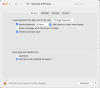
Parallels just updated to Version 18.2.0 (53488). On Parallels Resume or Start, a popup says "To start...you need to allow the Parallels Hypervisor System Extension." I click on Open Security Preferences, Security & Privacy opens, but there's no app to approve (see attachment). Restarting iMac and Parallels returns the same results. Please advise how to proceed.
 

Attachments

  • Screen Shot 2023-02-14 at 4.58.40 PM.png
    Screen Shot 2023-02-14 at 4.58.40 PM.png
    289.5 KB · Views: 19
As you can see in the attachment, the message "System software from developer 'Parallels International GmbH' was blocked from loading" never appears, so the KB article doesn't apply
 
No luck. Same symptoms as before. Security & Privacy > General does not show the message "System software from developer 'Parallels International GmbH' was blocked from loading" doesn't appear when Parallels Hypervisor is enabled. The VM stops at the security message on start.
 
Back
Top