Any news on Win 98?

mdchaney

Junior Member
Like others here, I have a Win 98 vm that ran fine under 3.0 and won't get through the boot process, safe mode or otherwise, under 4.0. I hate even having Win 98 around, but as a web developer I have to test sites under IE6. Ugh.

Just got a new MacBook Pro and this is the only thing keeping me from wiping the old one.

I've been submitting reports, but would love to hear from Parallels.

As an aside, if I check "Primary OS Screenshot" on the error reporter it tells me that the report cannot be sent after spending a few minutes trying to send it. This is a consistent error. FYI.

Michael
 
I hope the developers can find what makes the Win 98 VM cause a crash on startup when certain programs have been installed(It seems like the programs don´t even have to be ran for the crash to occur at restart). I also don´t like "the return of freeze at shutdown"-glitch. However, as long as one don´t run into a VM crash, everything seems a bit faster, especially with the Parallels Video Adapter installed.
Please put some effort in locating this bug!

EDIT:
This article in the knowledge base solved my problem:

http://kb.parallels.com/en/4683

Also discovered that WWMD at the third line of C:\AUTOEXEC.BAT is sometimes necessary.
 
Last edited:
I've already had that workaround installed on my win98. The issue of it not booting after the 4.0 upgrade is separate.
 
If you have win98 (comes with IE4) just to run IE6, then you should know that IE6 runs on Win2K (comes with IE5.5 but it's upgradable to IE6) and WinXP (comes with IE6).
 
I've already had that workaround installed on my win98. The issue of it not booting after the 4.0 upgrade is separate.

When the machine crashes at startup the system will remember that the last attempt to boot failed and will give you the option to use the MS-DOS prompt. When chosen, type EDIT C:\AUTOEXEC.BAT and insert the line I suggested in the previous post then save. Reboot and make sure the mouse pointer gets locked by the VM as soon as possible. Do you still have the problem?
 
If you have win98 (comes with IE4) just to run IE6, then you should know that IE6 runs on Win2K (comes with IE5.5 but it's upgradable to IE6) and WinXP (comes with IE6).

Yeah, except that I have the win98 license laying around. I also have a separate xp vm for ie7.
 
When the machine crashes at startup the system will remember that the last attempt to boot failed and will give you the option to use the MS-DOS prompt. When chosen, type EDIT C:\AUTOEXEC.BAT and insert the line I suggested in the previous post then save. Reboot and make sure the mouse pointer gets locked by the VM as soon as possible. Do you still have the problem?

Didn't help. What are the first two lines of your autoexec.bat?
 
mode con codepage prepare=((850) C:\WINDOWS\COMMAND\ega.cpi)
mode con codepage select=850
WWMD

This is the first three lines of my AUTOEXEC.BAT

On second thought: This solution seems a bit unreiiable. Only hopes that an update fixes it.
 
Last edited:
mode con codepage prepare=((850) C:\WINDOWS\COMMAND\ega.cpi)
mode con codepage select=850
WWMD

This is the first three lines of my AUTOEXEC.BAT

On second thought: This solution seems a bit unreiiable. Only hopes that an update fixes it.

Having the wwmd in mine actually causes it to dork the display up. It also puts up:

Code page operation not supported on this device
Device error during select

when I add your other two lines.

Very frustrating, but I'll likely just try to reinstall win98.
 
Hmm.. escuse me, but I think the whole point of WWMD is that it goes fullscreen (causes some sort of refresh) and then quits, for that you have to set it to do so via properties as the kb says. The other 2 lines in teh Autoexec just set the codepage and shouldn't have any influence on the issue at hand, and you're better off not including them since they set a codepage that might not be the most adequate to you.
 
Last edited by a moderator:
Hmm.. escuse me, but I think the whole point of WWMD is that it goes fullscreen (causes some sort of refresh) and then quits, for that you have to set it to do so via properties as the kb says. The other 2 lines in teh Autoexec just set the codepage and shouldn't have any influence on the issue at hand, and you're better off not including them since they set a codepage that might not be the most adequate to you.

Agree regarding the first two lines, but I´m pretty sure this "refresh" helped me at least once to get windows 98 started. Just take my words for it: It helped me!
Also: I did a fresh install of win 98 after PD 4(I had to because of the crashes!).
 
Last edited:
Tried reinstalling Win 98 from the CD today - same problem as when I try to import the Parallels v3 VM. I just plain can't run Windows 98 under v4. This is a major problem, and I wouldn't have updated had I known.
 
Sigh. I went ahead and upgraded to version 3, and all my vms run fine again. v4 looked promising, hopefully I'll be able to use it soon.
 
I have the same problem.

That says it all. Has anybody heard any peep on this from anybody at Parallels? This stinks. I specifically keep Parallels around *BECAUSE* it does Win98 w/ sound and OpenStep and funny stuff that VMware doesn't. I want my money back, or a solution to this already ... Win98 is plainly there on the supported list.
 
I don't remember the error now - the VM would stop and Parallels would put up the page for me to send the error to the company. I did that probably 5 times, so it should be fairly easy for you to find my errors between 11/14 and 11/17.

Win98 would actually install, but when it tried to reboot it would die during the boot process in the same manner. Safe mode didn't help.
 
my problem with Windows 98

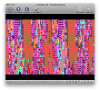
I get no error message. The virtual machine (the same VM was working with 3.x too) goes to its splash screen and looks like it's booting, but doesn't. It almost always goes to text mode and hangs, but sometimes comes back to a lined-up version of the Windows 98 splash screen.

See the attached screenshot - this is how ti hangs for me.
 

Attachments

  • Picture 1.png
    Picture 1.png
    196.4 KB · Views: 10
Back
Top