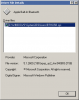
I want to use bluetooth under PD 4.0 build 3540 in oder to synchronize my mobile phone with Lotus Notes. I managed to connect the VM to the Apple Bluetooth USB Host Controller. Thereafter, I was able to carry out the first steps of mounting the mobile phone to the VM. The Bluetooth device manager found the mobile phone generated an access code which I typed into the phone and send it to the VM.
There, the problem started: the connection between the Apple bluetooth transceiver and the VM broke down and the mobile phone was disconnected from the VM. The icon in the VM's bluetooth controller next to "Apple Bluetooth USB Host Controller" disappeared but the Apple bluetooth device was not released by the VM so it was not accessible anymore until the VM was shut down.
Any hint how to avoid this problem - or how to make bluetooth work in the VM? With PD 3.0 there was no such problem.
JoOppen
My config:
MBP 2,16 GHz MacOS 10.4.11 German
PD 4.0 build 3540
No BootCamp
Win XP Pro German
There, the problem started: the connection between the Apple bluetooth transceiver and the VM broke down and the mobile phone was disconnected from the VM. The icon in the VM's bluetooth controller next to "Apple Bluetooth USB Host Controller" disappeared but the Apple bluetooth device was not released by the VM so it was not accessible anymore until the VM was shut down.
Any hint how to avoid this problem - or how to make bluetooth work in the VM? With PD 3.0 there was no such problem.
JoOppen
My config:
MBP 2,16 GHz MacOS 10.4.11 German
PD 4.0 build 3540
No BootCamp
Win XP Pro German