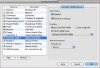
After upgrading to Leopard, I rebooted and got some kind of Boot Camp error message.
I didn't pay much attention to it, but then I noticed that I started to experience the same problems that other people have stated in other threads:
http://forum.parallels.com/showthread.php?t=17016
http://forum.parallels.com/showpost.php?p=86292&postcount=5
My only recourse was to revert to my snapshot, which (fortunately) I had created just before the Leopard upgrade.
Shortly after I reverted, the Boot Camp installer once again attempted to install inside the Parallels Windows image (see linked image). I suspect that the problems I encountered after the upgrade will resume. We shall see...

I didn't pay much attention to it, but then I noticed that I started to experience the same problems that other people have stated in other threads:
http://forum.parallels.com/showthread.php?t=17016
http://forum.parallels.com/showpost.php?p=86292&postcount=5
My only recourse was to revert to my snapshot, which (fortunately) I had created just before the Leopard upgrade.
Shortly after I reverted, the Boot Camp installer once again attempted to install inside the Parallels Windows image (see linked image). I suspect that the problems I encountered after the upgrade will resume. We shall see...