BootCamp Virtual Machine Missing After Upgrading To PD 13......

JasperL

Bit poster
Hi,
Does anyone missing the existing Virtual Machine (Win10 Pro) after upgrading to PD13 like me?

I cannot open or reinstall my bootcamp Windows 10 after upgrading to PD13. I've tried everything I could also including any method I can find on internet or Parallels QnA.
Could anyone give me some suggestions?

MacBook Pro 15 Retina(2013)
Mac OS 10.13 GM (I'd had this issue since 10.12)

Thanks
Jasper
 

Attachments
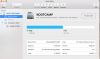
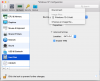
  • Disk Utility.png
    Disk Utility.png
    279.2 KB · Views: 35
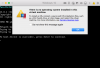
  • Screen Shot 2017-09-16 at 19.09.25.png
    Screen Shot 2017-09-16 at 19.09.25.png
    240.8 KB · Views: 35
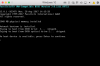
  • Screen Shot 2017-09-16 at 19.09.43.png
    Screen Shot 2017-09-16 at 19.09.43.png
    147.5 KB · Views: 36
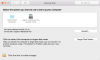
  • Screen Shot 2017-09-16 at 19.09.51.png
    Screen Shot 2017-09-16 at 19.09.51.png
    111 KB · Views: 34
Last edited:
Hi JasperL. Please navigate to Apple Icon -> System Preferences... -> Startup Disk and check if the boot camp partition appears there. If it does, then please reboot your Mac into the native Windows boot camp installation and confirm whether Windows works fine there. If not, then please contact Apple support for further assistance.
 
Last edited:
Hi JasperL. Please navigate to Apple Icon -> System Preferences... -> Startup Disk and check if the boot camp partition appears there. If it does, then please reboot your Mac into the native Windows boot camp installation and confirm whether Windows works fine there. If not, then please contact Apple support for further assistance.
Hi,
The bootcamp partition appears normally and works fine as well.
 

Attachments

  • Screen Shot 2017-09-18 at 00.49.00.png
    Screen Shot 2017-09-18 at 00.49.00.png
    144.9 KB · Views: 15
Jasper, this is the same issue I'm experiencing.
It is frustrating to pay the subscription and not be able to use the latest version. Still waiting for Parallels to fix this.
 
Hi JasperL. Please navigate to Apple Icon -> System Preferences... -> Startup Disk and check if the boot camp partition appears there. If it does, then please reboot your Mac into the native Windows boot camp installation and confirm whether Windows works fine there. If not, then please contact Apple support for further assistance.
Hemnath, this really seems to be a severe Parallels V13 bug. How can you explain that just by uninstalling V13 and reinstalling V12 makes my VM work again without changing anything?
It seems V13 does require either extra access permissions to the VM folders or did change the file access procedure. The HD image is there but V13 can't access it.
It is frustrating to just paid the subscription renewal and not be able to use the latest version.
 
Hemnath, this really seems to be a severe Parallels V13 bug. How can you explain that just by uninstalling V13 and reinstalling V12 makes my VM work again without changing anything?
It seems V13 does require either extra access permissions to the VM folders or did change the file access procedure. The HD image is there but V13 can't access it.
It is frustrating to just paid the subscription renewal and not be able to use the latest version.

Hi fpmalard,
I agree with you. The issue bother me badly.
But so far, it seems they do nothing except burying their head in sand. Because there are a lot of PD13 users is talking about this issue and the PD still cannot offer us a solution.
 
Same issue here after Mac OS upgraded to HighSierra.
I thought it might be the PD11's issue, then bought and upgraded PD to version 13. However, still with the same problem.
I do can see the Bootcamp partition in Mac OS, and can also run Windows 10 Pro on Bootcamp mode. However, same as your second screenshot indicated, no hard disk partition can be seen on "Hard Disk" page.


Hi,
Does anyone missing the existing Virtual Machine (Win10 Pro) after upgrading to PD13 like me?

I cannot open or reinstall my bootcamp Windows 10 after upgrading to PD13. I've tried everything I could also including any method I can find on internet or Parallels QnA.
Could anyone give me some suggestions?

MacBook Pro 15 Retina(2013)
Mac OS 10.13 GM (I'd had this issue since 10.12)

Thanks
Jasper
 
Same problem. Boot Camp works fine and Windows works fine when booting into it. Parallels 13 setup (File>New) cannot find the boot camp partition at all, so I am rolling back to v12.
WTF??
 
Same problem. Boot Camp works fine and Windows works fine when booting into it. Parallels 13 setup (File>New) cannot find the boot camp partition at all, so I am rolling back to v12.
WTF??
Did going back to V12 fix your problem? this is so frustrating. I had a version of VM ware and it could not detect my boot camp partition and I purchased parallels thinking the problem was with VM ware fusion. I hope this gets resolved quickly
 
Same here. I have a perfectly working Windows on my boot camp. The partition is visible in MacOS. There seems to be no problem at all but I cannot see the partition in Parallels 13. Even with the described manual configuration method, I cannot find the boot camp partition. Heeeeeelp
 
New to parallels here. Same issue all working fine High Sierra, Windows 10 each boot and works fine. Parallels does not see partition. I'm glad I'm on trial verision only.
 
Same problem here. As usual we will need to wait months while they reject our reports and blame someone else for their incompetence.
 
Me too... Parallels 13 not locate a bootcamp partition on High Sierra. The partition bootcamp is ok and running out of parallels....
 
Same problem here. Updated to MacOS 10.13 and it cannot see the Boot Camp partition to install. Frustrating. Tech Support went in by Logmein and had a quick peek. Supposedly the problem has been "escalated". Not sure why they bothered with the logmein at all because it seems to be a fairly universal issue. Amazing because 10.13 has been in beta for so long so you'd think they'd catch it...
 
I am having the same issue. Everything worked fine with Parallels 11 and Sierra. I upgraded to High Sierra and my Windows 7 Bootcamp VM no longer worked. I then upgraded to Parallels v13 and went through the install. On first try I was able to access my Bootcamp VM and so I figured everything was okay.

Today when I went to use the Bootcamp VM I got the same warning message as everyone else: The Bootcamp is suspended and can't be resumed. "No boot device is available..." The Parallels warning indicates: "The specified file cannot be used as a virtual hard disk. Please specify another file." "Unable to connect to hard disk 1".

I have uninstalled Parallels v13, rebooted my Mac and reinstalled v13, but I continue to get the same errors as above and cannot use my Bootcamp VM which is the reason I upgraded to v13 in the first place.

I am able to log directly into Bootcamp and use my Windows 7 install with no problems. The issue appears to lie with Parallels v13.

Hoping for a fix very soon.
 
Back
Top