hi
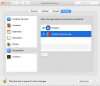
I have Excel 2016 installed on my Mac and Parallels 15 running Windows 10, but I have a Windows program which collects data for me every 2 hours. I need to write a macro which will open the file this program creates from the Windows side and copy the data to a standard Excel spreadsheet. For this to happen, I need to identify the exact location of the files on the VM; so it is not just C:\Prices\2020...which is the local folder on the VM. There is more to the exact location. I also need Excel to be able to open and save to the VM folders, which it cannot currently, yet I have all the correct permissions in PD.
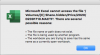
So what I needed to do to identify the exact location of the folder is to create a new Excel blank file and save it to the folder on the VM. That was where problem 1 surfaced. The following message popped up when trying to save

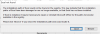
So I saved the file on my Mac and copied it across to the VM. That works, so am wondering why Excel cannot save to that location. I then created a macro to tell me the exact location the file is in, but when I try to save the macro in the macro enabled file, the same message pops up.
How is it possible for Excel for Mac to have proper access to the VM folders, for both saving and opening?
Thanks in advance
I have Excel 2016 installed on my Mac and Parallels 15 running Windows 10, but I have a Windows program which collects data for me every 2 hours. I need to write a macro which will open the file this program creates from the Windows side and copy the data to a standard Excel spreadsheet. For this to happen, I need to identify the exact location of the files on the VM; so it is not just C:\Prices\2020...which is the local folder on the VM. There is more to the exact location. I also need Excel to be able to open and save to the VM folders, which it cannot currently, yet I have all the correct permissions in PD.
So what I needed to do to identify the exact location of the folder is to create a new Excel blank file and save it to the folder on the VM. That was where problem 1 surfaced. The following message popped up when trying to save
So I saved the file on my Mac and copied it across to the VM. That works, so am wondering why Excel cannot save to that location. I then created a macro to tell me the exact location the file is in, but when I try to save the macro in the macro enabled file, the same message pops up.
How is it possible for Excel for Mac to have proper access to the VM folders, for both saving and opening?
Thanks in advance