Can't find my activation key to change to new computer

JasonS7

Junior Member
I remember being able to log into my account to find my key for Parallels Desktop 10, but now that I go to look it up to change it over to a new computer I can't find my key on my account anywhere. Very frustrating.

Anyone know how I can find my key to make the change as I have tried what the support forum said but those options don't lead me to my key.
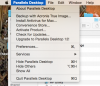
 
Also looking into how to deactivate the old one they say:

"Click on the Parallels Desktop menu, and select Account & License. In the activation window, click on your account email address and select Sign Out."

But nowhere on the menu is there an Account & License option
 
Don't see anything that says Account & License
 

Attachments

  • Screen Shot 2017-08-14 at 1.28.56 PM.png
    Screen Shot 2017-08-14 at 1.28.56 PM.png
    122.2 KB · Views: 28
That makes no sense as I have never logged out and I can still Run Parallels on that mac with no issues.

If I click activate product it tells me "This is an active copy of Parallels Desktop."


I am still waiting for you to help me retrieve my activation key so I can type it in on the new macbook i migrated everything to.
 
I am still looking for how I log out. I finally got my license key but I can't use it as it says it is still active on the other computer. I can't follow your direction as I have pointed out there is no option in the menu.

Please help.
 
I realize you did. I have that now. I was asking how I deactivate it on the old mac as your support forum search only tells me about 11 and 12 and not 10.

The key has done me no good on the new mac when it tells me I need to deactivate it on the old one yet there is no easy way to deactivate it on the old one.
 
I realize you did. I have that now. I was asking how I deactivate it on the old mac as your support forum search only tells me about 11 and 12 and not 10.

The key has done me no good on the new mac when it tells me I need to deactivate it on the old one yet there is no easy way to deactivate it on the old one.
You don't have an option to deactivate Parallels Desktop 10 on the old Mac. Please follow the instructions below to activate it on the new Mac:
1. Quit Parallels Desktop, then try to activate after launching it again.
2. If you are still unable to activate, Open Terminal on the Mac and execute this command: prlsrvctl activate-license-online
 
I just bought a subscription for yearly, but seems I cannot find my license key for activation. I tried troubleshooting option but still problem is not fixed!
 
I just bought a subscription for yearly, but seems I cannot find my license key for activation. I tried troubleshooting option but still problem is not fixed!
Hello,
Thank you for the provided feedback.
We have sent you a private message, please check it and provide us with the requested information.
Best regards!
 
Back
Top