
I'm am running Chrome and VSCode under a MacOS guest VM. They both seem to refresh issues, where sections of the applications are just blank and so I can't see the icons or words to click on.
My host is MacOS 10.14.6, running Parallels 15.1.2, and the guest is 10.14.4. I was using Chrome 80.0.3987.87 and VSCode 1.4.11.
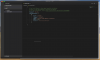
In the VSCode screenshot, there should be icons along the left side. And you can see a line of text in the editor area that is half cut off. When mousing over, you see lots of blinking that usually isn't there.
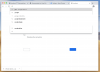
In the Chrome screenshot, you see missing lines of text, buttons missing text (grey outline and blue filled box towards bottom), a half cut off line of text, and where I'm typing in the URL area there should have been text too.
FWIW, I need the debugger functionality of Chrome and VSCode in the VM, so it's not like I can just run Safari as a work around.
My host is MacOS 10.14.6, running Parallels 15.1.2, and the guest is 10.14.4. I was using Chrome 80.0.3987.87 and VSCode 1.4.11.
In the VSCode screenshot, there should be icons along the left side. And you can see a line of text in the editor area that is half cut off. When mousing over, you see lots of blinking that usually isn't there.
In the Chrome screenshot, you see missing lines of text, buttons missing text (grey outline and blue filled box towards bottom), a half cut off line of text, and where I'm typing in the URL area there should have been text too.
FWIW, I need the debugger functionality of Chrome and VSCode in the VM, so it's not like I can just run Safari as a work around.