
In Coherence, it is possible to access the Windows Start menu by right-clicking on the parallels icon in the top menu bar:
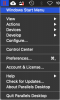
or by left-clicking it (which by passes that drop-down menu and goes directly to the Windows Start menu).
That is, in my hands, it works about half of the time: when I reach that stage, I can either get a solid Windows Start menu or it can flash briefly and disappear. Usually, the second attempt works fine.
Clearly that is a minor annoyance, but it smacks as a trivial bug, which hasn't been fixed for several versions and updates.
Am I the only one to experience this?
Note: I am not going to open a service request and receive the usual email: we want to take over your mac remotely to make some tests, at it usually ends up with "we will report to command central" and eventually nothing happens (in other words, I tried and it is still a "feature").
or by left-clicking it (which by passes that drop-down menu and goes directly to the Windows Start menu).
That is, in my hands, it works about half of the time: when I reach that stage, I can either get a solid Windows Start menu or it can flash briefly and disappear. Usually, the second attempt works fine.
Clearly that is a minor annoyance, but it smacks as a trivial bug, which hasn't been fixed for several versions and updates.
Am I the only one to experience this?
Note: I am not going to open a service request and receive the usual email: we want to take over your mac remotely to make some tests, at it usually ends up with "we will report to command central" and eventually nothing happens (in other words, I tried and it is still a "feature").