P
Parallels User
I suspect Dassault Systèmes doesn't support SolidWorks running in a virtual machine, particularly the free education version. But, I know that several have succeeded in installing and running it. However, I keep getting corrupt file errors. I examined the logs from my failed installations and was unable to quickly determine why it failed. There was a reference to Microsoft VBA KB2783832 but that refers to command line installations not using the SW Install Manager. There was also a warning about the installation being run from an unknown location (which would likely relate to the installation in a virtual machine). And, there was also an error about my serial number not being eligible for the installation of SW Electrical Schematic (I had selected SW PCB as one of my options; I had entered the serial numbers I had been provided for both SW and SW PCB which includes SW Electrical Schematic). There is also a reference to the installation failing with error code 1603 which may relate to the installation path being too long. I suspect that to be the big problem.
I tried again, this time deselecting SW PCB but got the same error (corrupt file; something like i386_S~5.cab; I have attached a screen shot). The error message says something about deleting the source directory and trying again. To me, the source directory is on the server. So, I'm not sure what they're referring to. Perhaps this is related to the unsupported platform but I'm suspecting that it is not.
I'm wondering if I can get someone knowledgeable to take a look at one of my install log files.
If the path length is too long, what can I do to shorten it? I'm not sure that the SW Install Manager offered me any opportunity to select the install location. Or, is it possible to install a Windows program to an external drive to achieve a shorter path?
--
Ray D
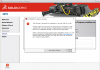
I tried again, this time deselecting SW PCB but got the same error (corrupt file; something like i386_S~5.cab; I have attached a screen shot). The error message says something about deleting the source directory and trying again. To me, the source directory is on the server. So, I'm not sure what they're referring to. Perhaps this is related to the unsupported platform but I'm suspecting that it is not.
I'm wondering if I can get someone knowledgeable to take a look at one of my install log files.
If the path length is too long, what can I do to shorten it? I'm not sure that the SW Install Manager offered me any opportunity to select the install location. Or, is it possible to install a Windows program to an external drive to achieve a shorter path?
--
Ray D